Inventory & Trial Balance Reconciliation
Microsoft Dynamics 365 Finance & Operations
Inventory Valuation Report to Trial Balance Reconciliation
Process document and reconciliation framework
This document defines the standard method for reconciling the closing inventory value reported by Dynamics 365 Finance & Operations against the inventory control balances in the trial balance. It sets out what each balance represents, the sequence of extraction and comparison steps, the reconciling items that must be quantified, and the checks that close the exercise.
The procedure applies to period-end and year-end reconciliation of inventory control accounts at item group level, which is the level at which inventory posting profiles are normally defined. The same sequence applies at item level where posting profiles are configured per item.
A difference between the Inventory value report (IVR) and the trial balance is not, by itself, evidence of a posting error. It is frequently a timing difference, an unfinished costing event, a value posted outside the inventory subledger, or a report scoped differently from the ledger. The objective of this process is therefore not only to reach a nil difference, but to explain every component of it.
2.1 Inventory value report
The IVR is produced from inventory transactions and their settlements. It can present physical quantity, financial quantity, posted and unposted physical amounts, financial (inventory) amount, work in process, deferred cost of goods sold and profit-and-loss activity, depending on the report configuration selected. The financial inventory amount always corresponds to value that has reached the general ledger. The posted physical amount does so as well, but only where physical posting to the ledger has been enabled; where it has not, that column carries value with no ledger counterpart and must be left out of the comparison.
Two properties of the report govern its use in reconciliation. First, the report output does not carry general ledger balances, even where main accounts are named in the report configuration; the ledger side must always be taken from the trial balance or voucher transactions. Second, the report carries financial value only for dimensions on which Financial inventory is enabled in the storage or tracking dimension group. Where site is financially tracked but warehouse or batch is not, value is summarised at site level and blank warehouse or batch values are a configuration outcome, not missing inventory.
2.2 Trial balance
The trial balance reflects every voucher posted to the inventory control accounts, irrespective of source. That includes inventory subledger postings, inventory close and recalculation adjustments, and any manual journal posted directly to the account. Manual journals and opening balance vouchers are visible in the ledger under posting type Ledger journal and have no counterpart in the IVR.
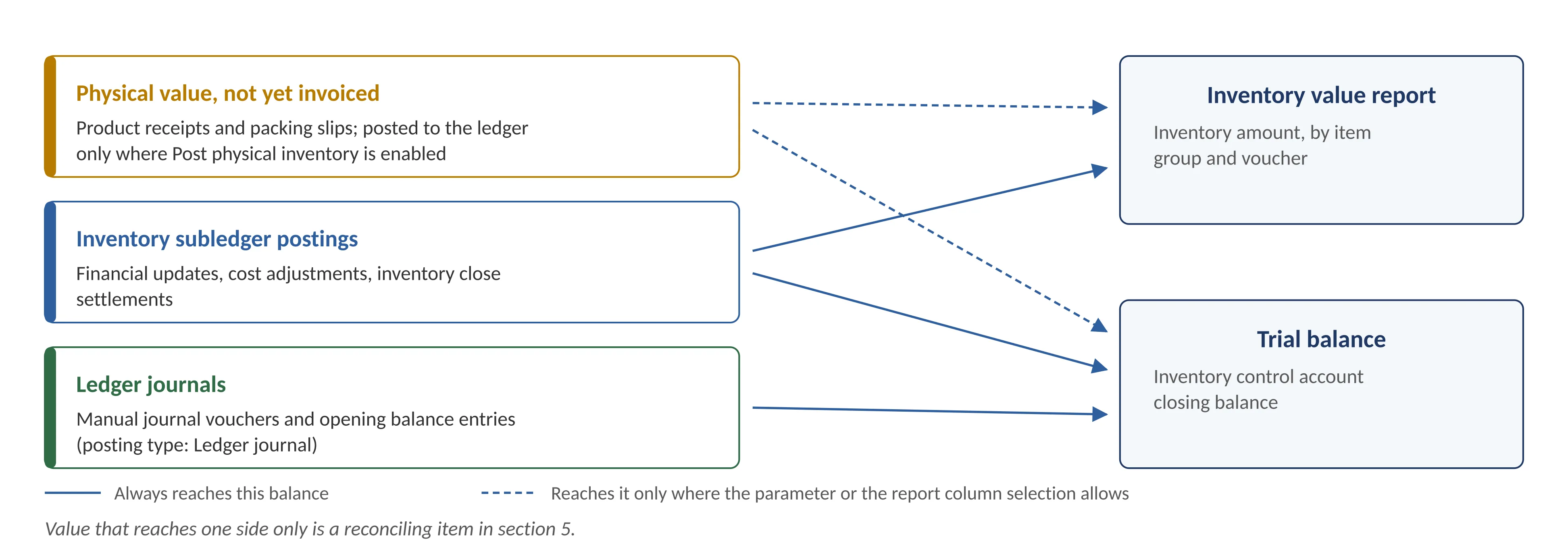
Figure 1 — Which sources of value reach the inventory value report and which reach the ledger
2.3 Physical and financial updates
Inventory movements are recorded in two stages. For purchases, the product receipt is the physical event and the vendor invoice is the financial event; for sales, the packing slip and the invoice follow the same pattern. A single movement can therefore carry a physical date, a financial date, separate vouchers for each stage, a later cost adjustment from inventory close, and different financial dimensions captured at each stage. Whether the physical stage reaches the ledger at all is a configuration choice. Where Post physical inventory is enabled on the item model group, the product receipt and packing slip generate ledger vouchers of their own, and that value sits in the designated physical accounts, typically inventory receipt or accrued purchases against the purchase accrual account. Where the parameter is not enabled, the physical stage creates no ledger entry and the value exists only in the report.
This determines the scope of the reconciliation rather than the method. Where physical posting to the ledger is enabled, the physical value is a real ledger balance: the accounts that carry it are brought into the account scope, the posted physical columns are included in the report extract, and both sides are compared on the same basis. Where it is not enabled, the physical columns are excluded and only the financial inventory amount is compared. What is not acceptable is including the physical value on one side and not the other.
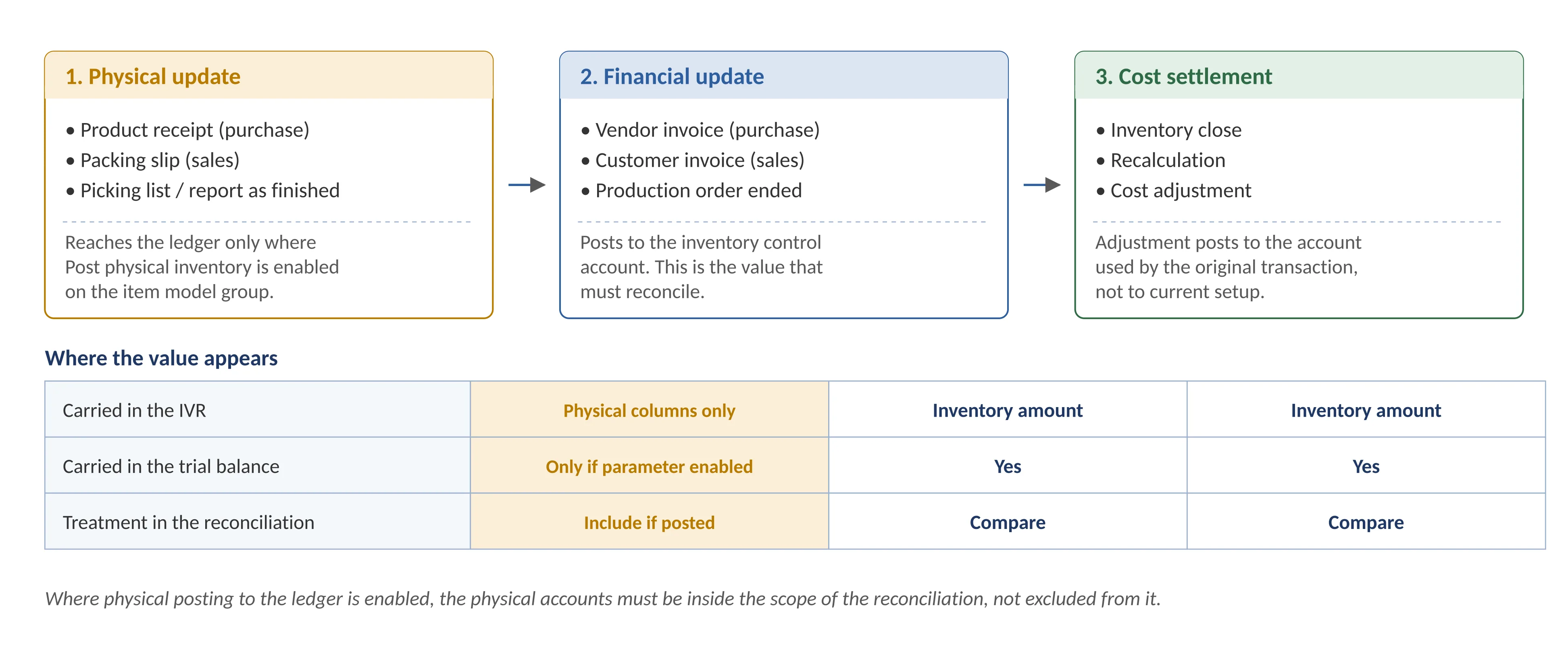
Figure 2 — Physical update, financial update and cost settlement as separate events
The following parameters must be fixed and identical on both sides before any extract is taken. Most unexplained variances originate here.
Parameter | Basis |
|---|---|
Legal entity | Single legal entity per reconciliation; no cross-company consolidation. |
Cut-off date | Period end date used for both the trial balance and the IVR date interval. |
Currency | Accounting currency on both sides; reporting currency values are not comparable to the trial balance. |
Account scope | All main accounts carrying inventory value for the item groups in scope, including accounts retired from current setup but used historically. |
Item scope | Item groups (or items) mapped to the accounts in scope through the inventory posting profile. |
Report configuration | IVR configuration listing the columns to be included; physical (unposted) columns excluded. |
Financial dimensions | Same dimension filters applied on both sides, or none applied on either. |
Physical posting to ledger | Confirm whether Post physical inventory is enabled on the item model groups in scope. Where it is, include the physical posting accounts in the account scope and the posted physical columns in the report. |
Opening position | Confirm that the closing balance of the preceding period was reconciled and signed off; that figure is the opening balance of this period. |
The opening position is the condition most often skipped. A reconciliation of the current period is only meaningful if the balance it starts from has already been agreed, because an unresolved difference in the preceding period is carried forward silently and appears in the current period as an unexplained variance of the same amount. Where the prior period was not reconciled, either reconcile it first or quantify the brought-forward difference separately, so that the current period movement can still be isolated and explained.
Inventory close or recalculation should be completed through the reconciliation date, after all material receipts and invoices for the period have been posted, and the close warning log reviewed before the extracts are taken. For manufacturing entities, production orders for the period should be financially ended so that estimated costs have been reversed and actual costs applied; where they have not, the related work in process accounts must be brought into the scope of the reconciliation.
The sequence below is followed in order. Steps 1 to 4 establish the comparison; steps 5 to 7 are performed only where the voucher-level comparison does not agree.
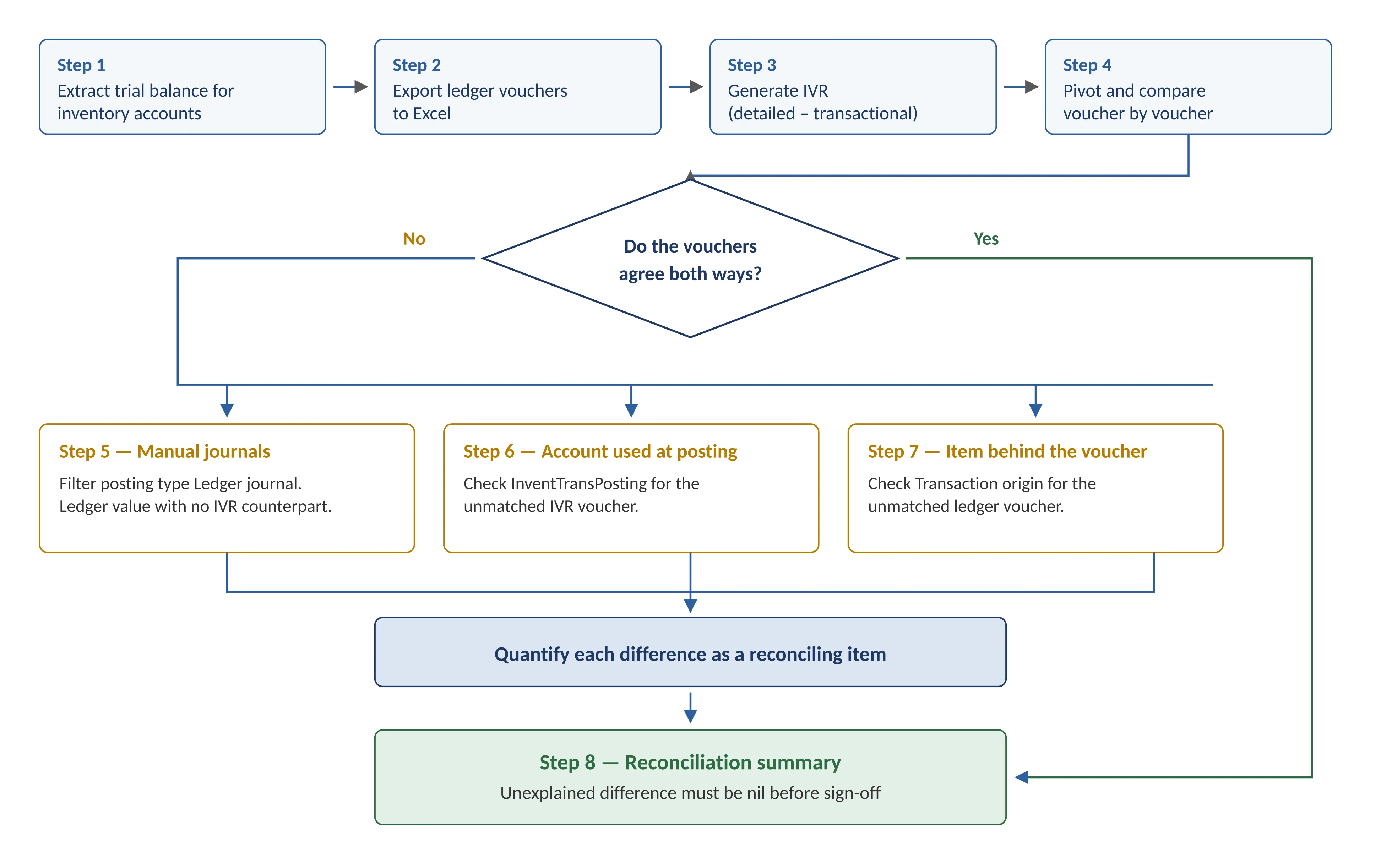
Figure 3 — Reconciliation process flow
Step 1 — Extract the ledger balance for the inventory accounts
Run the trial balance for the reconciliation period and select the inventory main account under reconciliation. Where several accounts are in scope, use Voucher transactions and apply a single filter across all required main accounts instead of running the trial balance account by account. Where physical posting to the ledger is enabled for the item model groups concerned, the physical posting accounts are extracted at the same time and on the same basis.
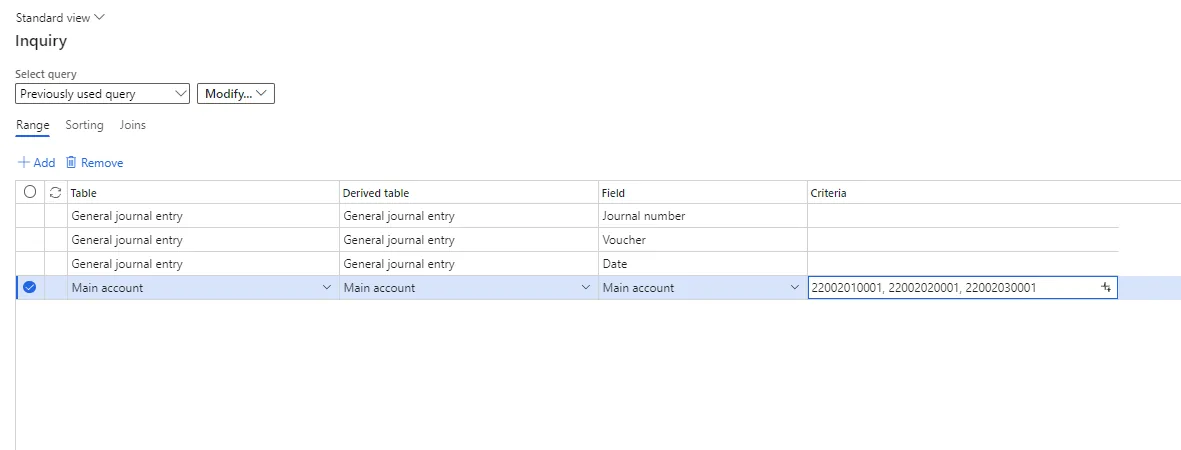
Figure 4 — Trial balance / voucher transactions filtered to the inventory main accounts
Step 2 — Export the ledger transactions
Export the voucher-level transactions of the selected accounts to Excel for the reconciliation period. Retain at minimum the voucher number, date, main account, posting type, amount and transaction text, as each of these is used in the later steps.
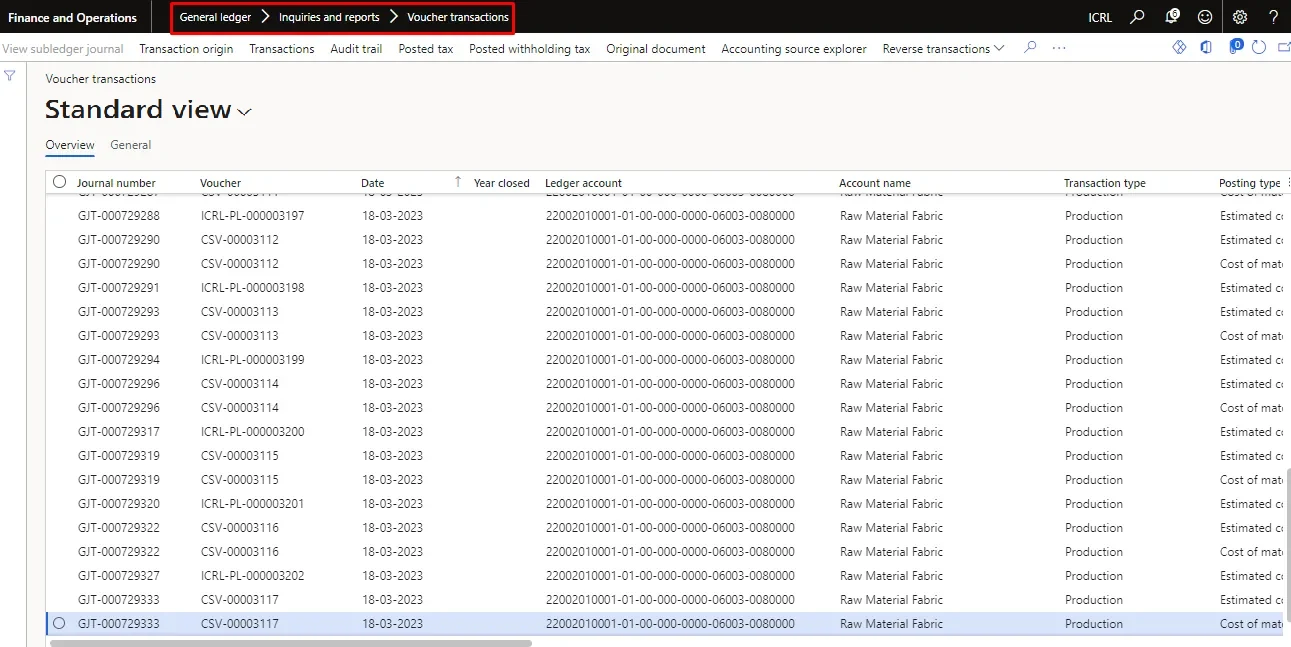
Figure 5 — Export of ledger transactions for the period
Step 3 — Generate the Inventory value report
Generate the IVR at Detailed (transactional) level for the same period, grouped by item group where the reconciliation is being performed at group level, or by item where posting profiles are defined per item. Include the beginning balance. Select the financial inventory amount columns, together with the posted physical columns where physical posting to the ledger is enabled; unposted physical columns are excluded in either case.
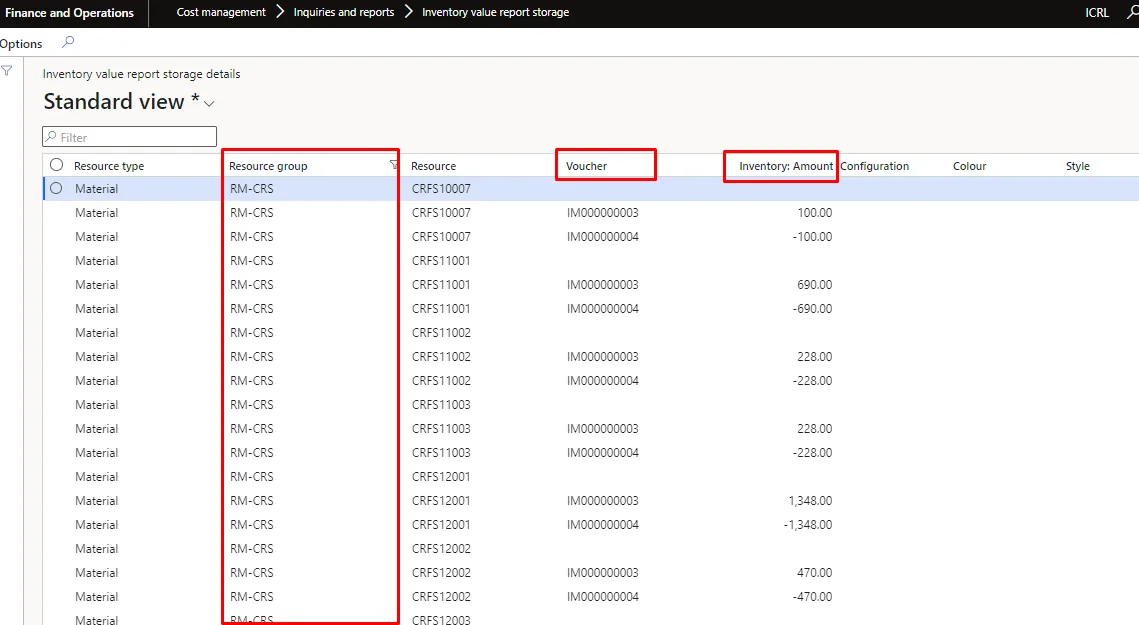
Figure 6 — Inventory value report parameters, detailed transactional level
Step 4 — Compare at voucher level
Build a pivot of the ledger dump and the IVR extract on voucher number and compare the two balances voucher by voucher. The IVR value used for comparison is the Inventory amount. The comparison should be run in both directions: ledger vouchers not present in the IVR, and IVR vouchers not present in the ledger extract.
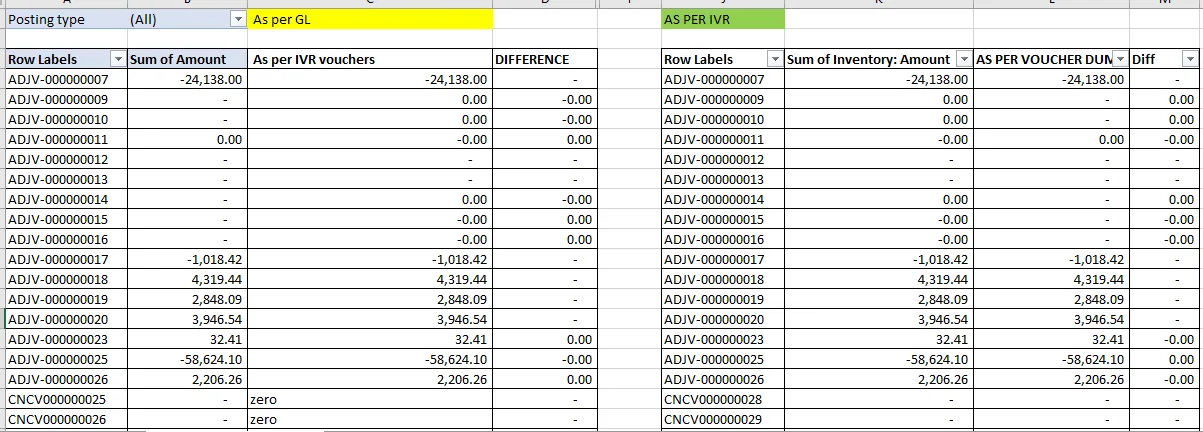
Figure 7 — Two-way voucher-level comparison of ledger and IVR values
Where the two sides agree at voucher level, the reconciliation is complete and the summary in section 5 can be prepared. Where differences appear, steps 5 to 7 identify their cause.
Step 5 — Identify manual journals posted to the inventory accounts
Filter the ledger extract on posting type Ledger journal to isolate manual journal vouchers and opening balance vouchers posted directly to the inventory account. These amounts are legitimate ledger balances but never appear in the IVR, because they did not originate in the inventory subledger. They are reported as a reconciling item and, as a control matter, should be restricted going forward under section 7.
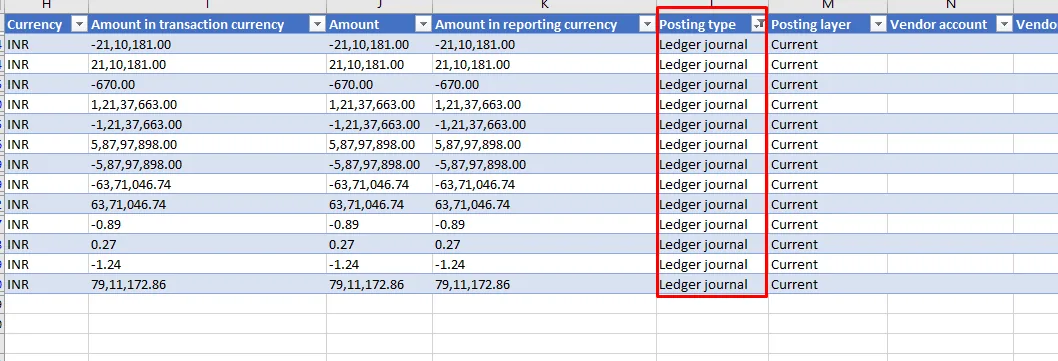
Figure 8 — Ledger journal postings in the inventory account
Step 6 — Identify IVR vouchers posted to a different main account
Where an IVR voucher has no match in the ledger extract, the transaction was posted to a main account other than the one under reconciliation. Open the InventTransPosting table through the table browser, filter on the unmatched voucher, and confirm which main account was used at the time of posting.
Table browser path: …dynamics.com/?cmp=<entity>&mi=systablebrowser&tablename=InventTransPosting
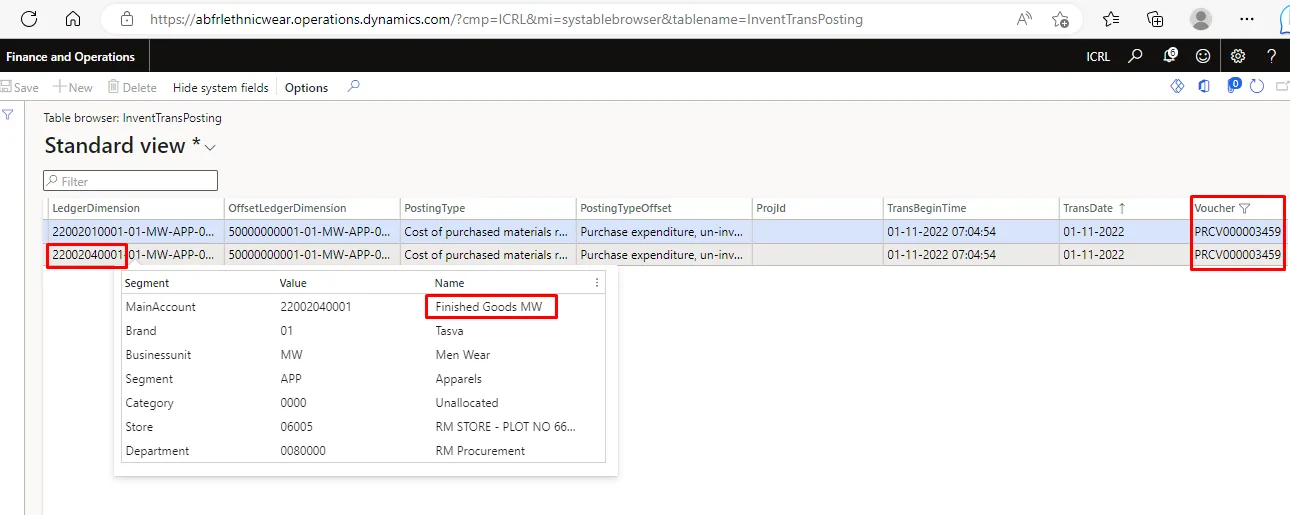
Figure 9 — InventTransPosting record showing the account used at the time of posting
This step also resolves the most common historical anomaly in inventory reconciliation. Inventory close and recalculation adjustments post back to the accounts used by the original transaction. Where the inventory posting profile was changed after the original posting, the adjustment follows the original account, not the account shown in current setup. The account in force at the date of the original transaction, not today’s configuration, is the correct reference.
Step 7 — Identify ledger vouchers belonging to another item or item group
Where a ledger voucher has no match in the IVR extract, the posting may relate to an item or item group outside the scope of the reconciliation but sharing the same main account. Open Voucher transactions, filter the voucher, select Transaction origin, and confirm the item and item group behind the posting.
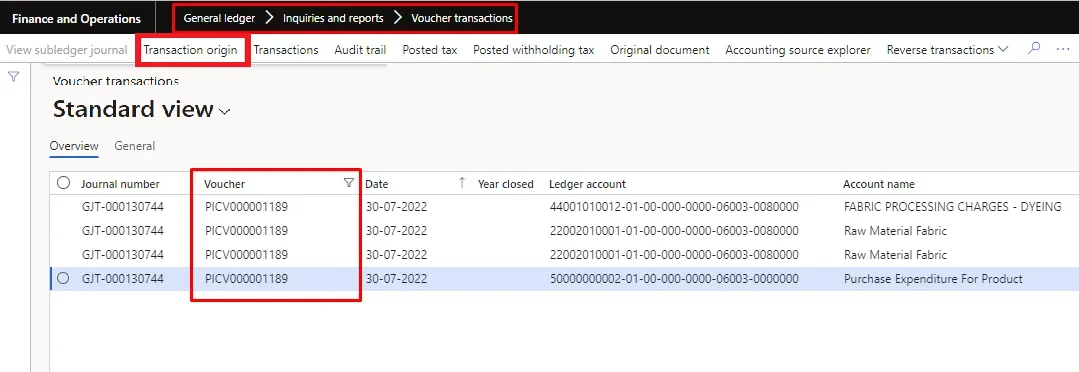
Figure 10 — Voucher transactions for the unmatched ledger voucher
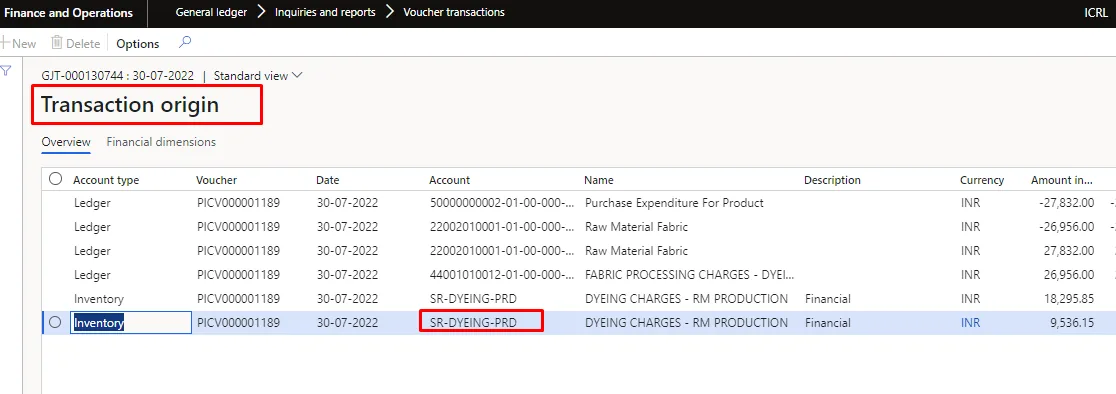
Figure 11 — Transaction origin for the voucher
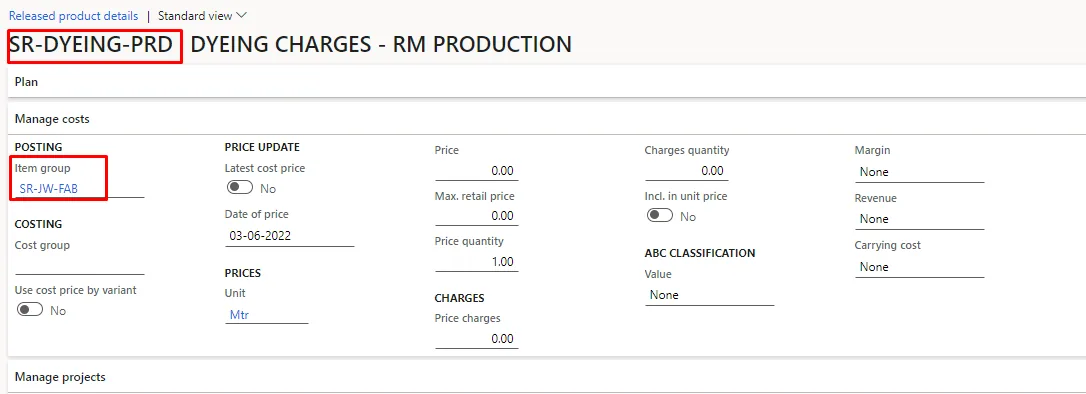
Figure 12 — Item and item group behind the ledger posting
A single main account shared by more than one item group will always produce this class of difference when the reconciliation is performed at group level. It is quantified as a reconciling item and, where material, addressed by separating the posting profile accounts.
Step 8 — Conclude and document
Summarise the IVR value, the ledger value and every reconciling item identified in steps 5 to 7 on a single reconciliation sheet, in the format set out in section 5. The reconciliation is complete only when the residual unexplained difference is nil and each reconciling item is supported by the voucher detail behind it.
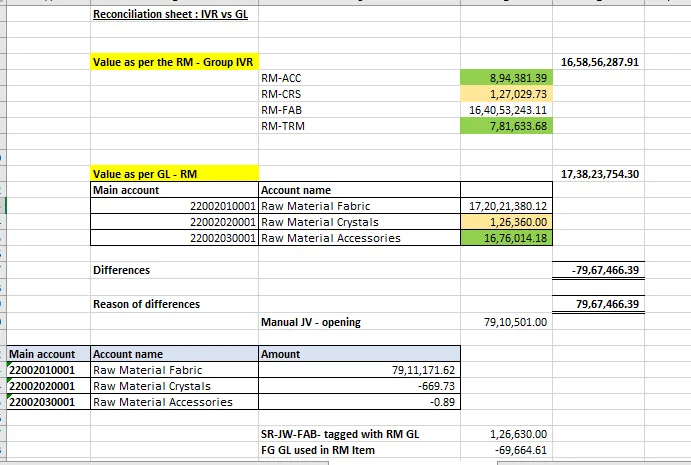
Figure 13 — Reconciliation summary: IVR value, ledger value, difference and reasons
The summary presents the bridge from the reported inventory value to the ledger balance. Each line is supported by a voucher-level schedule.
Ref | Description | Amount |
|---|---|---|
A | Closing inventory value as per IVR (financial inventory amount, item groups in scope) | |
B | Add: posted physical value, where physical posting to the ledger is enabled | |
C | Add: manual journals and opening balance vouchers posted through Ledger journal (step 5) | |
D | Add / (less): IVR vouchers posted to an inventory account outside the scope (step 6) | |
E | Add / (less): ledger vouchers relating to items or item groups outside the scope (step 7) | |
F | Add / (less): inventory close and recalculation adjustments posted to superseded accounts | |
G | Add / (less): unreconciled difference brought forward from the preceding period | |
H | Explained ledger value (A to G) | |
I | Closing balance as per trial balance for the accounts in scope | |
J | Unexplained difference (I − H) — must be nil |
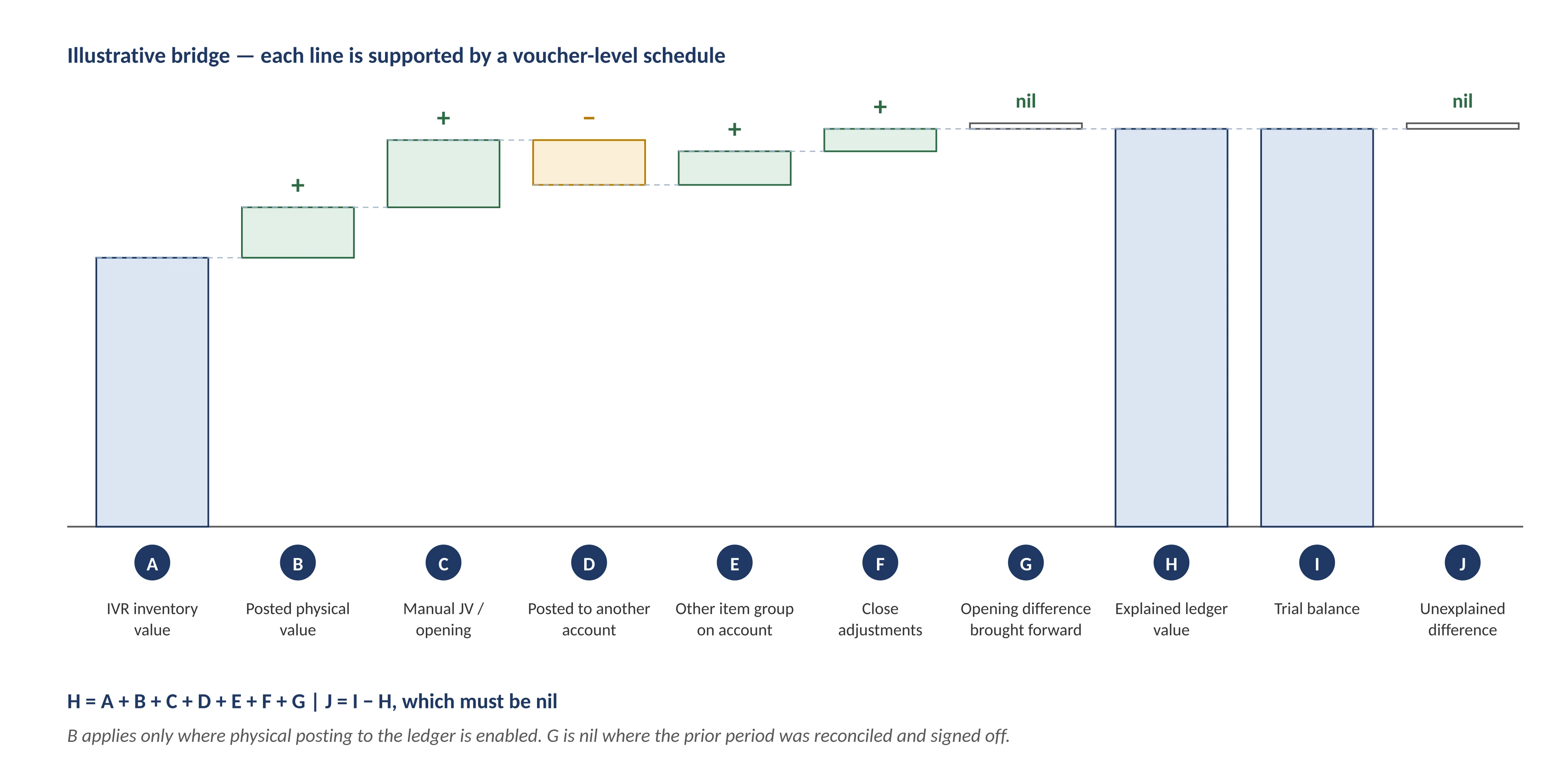
Figure 14 — Bridge from the reported inventory value to the ledger balance (illustrative)
Line B is nil where physical posting to the ledger is not enabled, and line G is nil where the preceding period was reconciled and signed off. Neither line should be used to absorb a residual that has not been traced to specific vouchers.
Where J is not nil, the reconciliation is not complete and the residual must be traced through inventory transaction details for the items concerned, covering physical and financial update dates, cost amounts, source document references, vouchers and the dimensions captured at each stage.
Reconciling item | Why it arises | Where to validate |
|---|---|---|
Opening balance and manual journals | Posted directly to the inventory account without an inventory transaction; no IVR counterpart. | Voucher transactions, posting type Ledger journal. |
Physical value not yet invoiced | Reaches the ledger only where Post physical inventory is enabled; where it does, the physical accounts belong in the account scope on both sides. | Item model group; IVR posted physical columns; physical posting accounts. |
Unreconciled opening balance | A difference left unresolved in the preceding period is carried forward and reappears as an unexplained variance of the same amount. | Prior period sign-off; IVR beginning balance against the opening trial balance. |
Shared main account | One account used by several item groups; group-level reconciliation cannot tie. | Transaction origin on the ledger voucher. |
Superseded posting profile | Close and recalculation adjustments post to the account used by the original transaction. | InventTransPosting; posting profile change history. |
Inventory close not completed | Issues still valued at running average cost; settlement adjustments not yet posted. | Inventory close status and warning log. |
Production activity not ended | Estimated costs not reversed; value held in work in process accounts. | Production order status; WIP account balances. |
Non-financial dimensions | Value summarised at the financially tracked level only; warehouse or batch shows blank. | Storage and tracking dimension groups. |
Cross-period timing | Financial update posted in a period later than the physical update. | Inventory transaction details: physical and financial dates. |
- System-controlled inventory accounts should be blocked from manual journal entry. A direct journal into an inventory control account disconnects the ledger from the subledger immediately. Corrections should be made through the source transaction in the subledger, or posted to a separate adjustment account.
- Inventory posting profiles should not be changed mid-period. Where a change is unavoidable, reconcile before and after the change, test outside production first, and retain a record of what was changed, by whom and when.
- The on-hand inventory consistency check is a corruption-recovery tool, not a reconciliation step. It applies where summarised on-hand quantities disagree with the underlying inventory transactions, where unexplained negative quantities exist, or where inventory close fails because summary tables are out of step with the transaction table. It should be scoped to the affected items and run in check mode before fix mode. A report-to-ledger variance is not, by itself, evidence of data corruption.
- Any corrective configuration or data action should be validated in a non-production environment before it is applied to production.
- The reconciliation should be performed monthly rather than at year-end only, with each step owned by a named function so that exceptions are cleared in the period in which they arise.
The following questions should be answered before the reconciliation is signed off.
- Are the legal entity, cut-off date, currency, account scope and dimension filters identical on both sides?
- Does the IVR include the beginning balance for the period?
- Was the preceding period reconciled and signed off, and does its closing balance agree to the opening balance of this period?
- Is Post physical inventory enabled for the item model groups in scope, and if so are the physical posting accounts and the posted physical columns included on both sides?
- Have unposted physical amounts been excluded from the IVR extract?
- Do period close and inventory close entries appear in the ledger vouchers, and was the close warning log reviewed?
- Have manual journals posted to the inventory accounts been identified and quantified?
- Is the same main account used by more than one item or item group, and has the resulting difference been quantified?
- Have IVR vouchers posted to inventory accounts other than the account under reconciliation been identified?
- Have production orders been financially ended, and are WIP accounts included where they have not?
- Is the residual unexplained difference nil, with each reconciling item supported by voucher-level detail?
- Has the reconciliation been reviewed and approved by the account owner in finance?
Parameter | Setting | Reason |
|---|---|---|
Report level | Detailed — transactional | Voucher-level comparison requires transaction granularity. |
Rows | Item group (or item) | Must match the level at which inventory posting profiles are defined. |
Columns | Financial inventory amount | Financially updated value always reaches the ledger. |
Posted physical columns | Included where physical posting to the ledger is enabled, otherwise excluded | Physical value reaches the ledger only when the item model group parameter is set. |
Unposted physical columns | Excluded | This value has no ledger counterpart in any configuration. |
Date interval | Reconciliation period to the cut-off date | Must match the trial balance period exactly. |
Beginning balance | Included | Ledger balances are cumulative; the report must be as well. |
Currency | Accounting currency | Comparable to the trial balance. |
Storage / tracking dimensions | Financially enabled dimensions only | Value is not carried at dimensions without financial inventory. |
Function | Responsibility |
|---|---|
Finance / general ledger | Trial balance extract, manual journal exceptions, sign-off of the reconciliation. |
Cost accounting | Inventory close execution and warning review, costing adjustments, IVR extract. |
Operations / warehouse | Timely posting of receipts, issues and production reporting within the period. |
IT / application support | Table browser access, posting profile change control, non-production validation. |