Accounting in D365, Part 3: Order to Cash
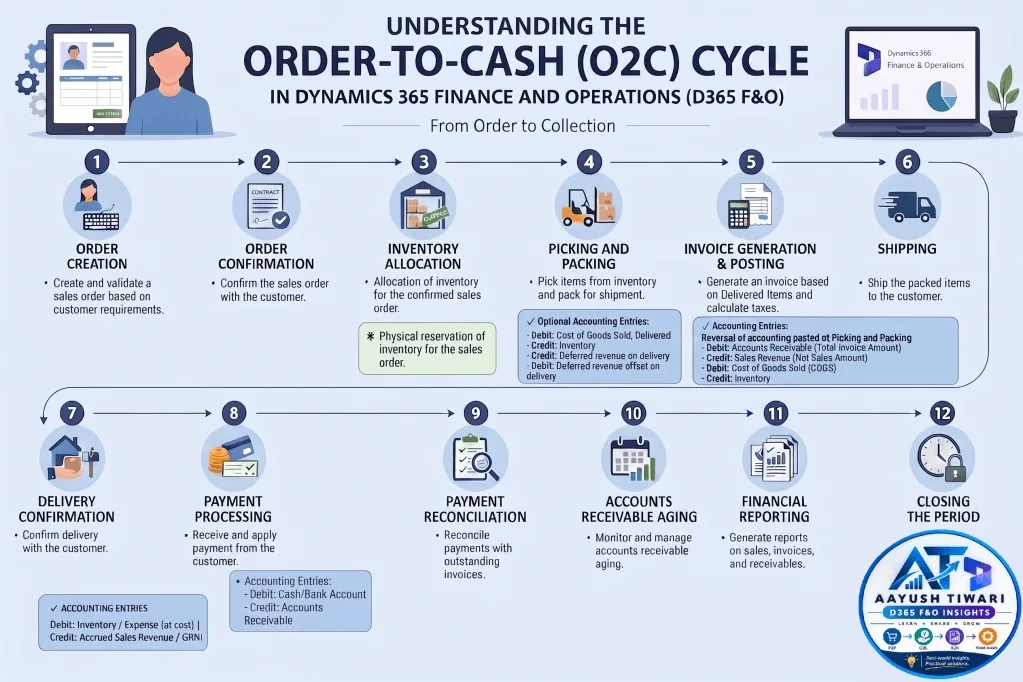
The O2C cycle is a fundamental process in any organization, ensuring smooth operations from order placement to cash receipt. Here’s a detailed breakdown of the key events and associated accounting entries in D365 F&O:
In D365 F&O, the cycle runs across Sales and marketing, Inventory and Warehouse management, Accounts receivable and General ledger. Each document update on the sales order (confirmation, picking list, packing slip, invoice and payment) moves the inventory transaction status forward and, where configured, posts a voucher to the ledger.
This is Part 3 of the Accounting in D365 series. It sells part of the finished goods produced in Part 2 (Raw Material to Finished Goods) to customer Wingtip Toys India Ltd. (INMF-000001) in legal entity INMF (currency INR). All vouchers are posted on 7 October 2026, and the trial balance opens with the closing balances of Part 2.
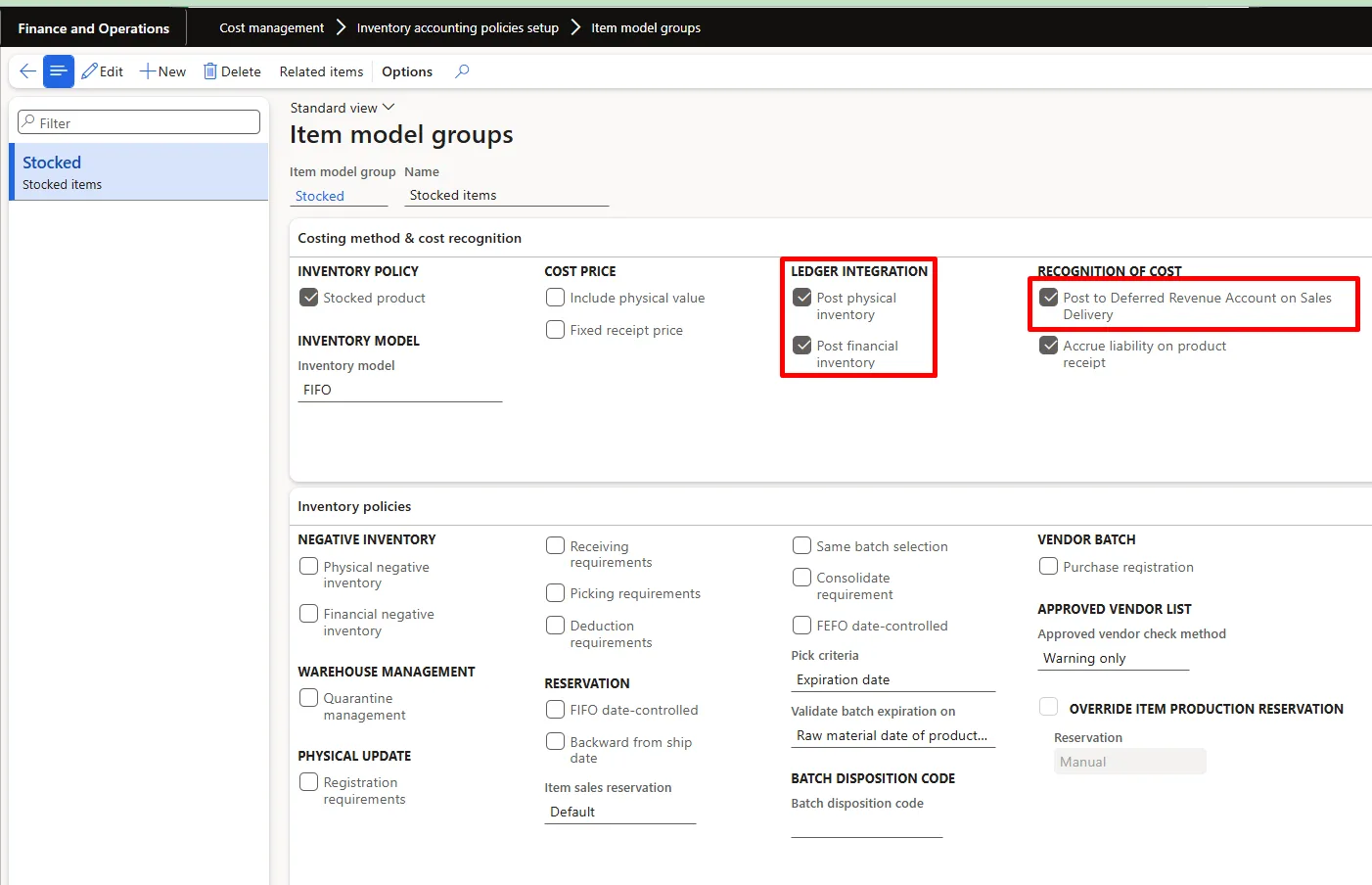
The vouchers explained below are driven by a few key setups in D365 F&O, which should be validated before the cycle is executed:
- Item model group – “Post physical inventory”, “Post financial inventory” and “Post to Deferred Revenue Account on Sales Delivery” control whether packing slips and sales invoices of stocked items update the general ledger.
- Accounts receivable parameters – “Post packing slip in ledger” controls whether the packing slip creates a physical voucher for cost and deferred revenue.
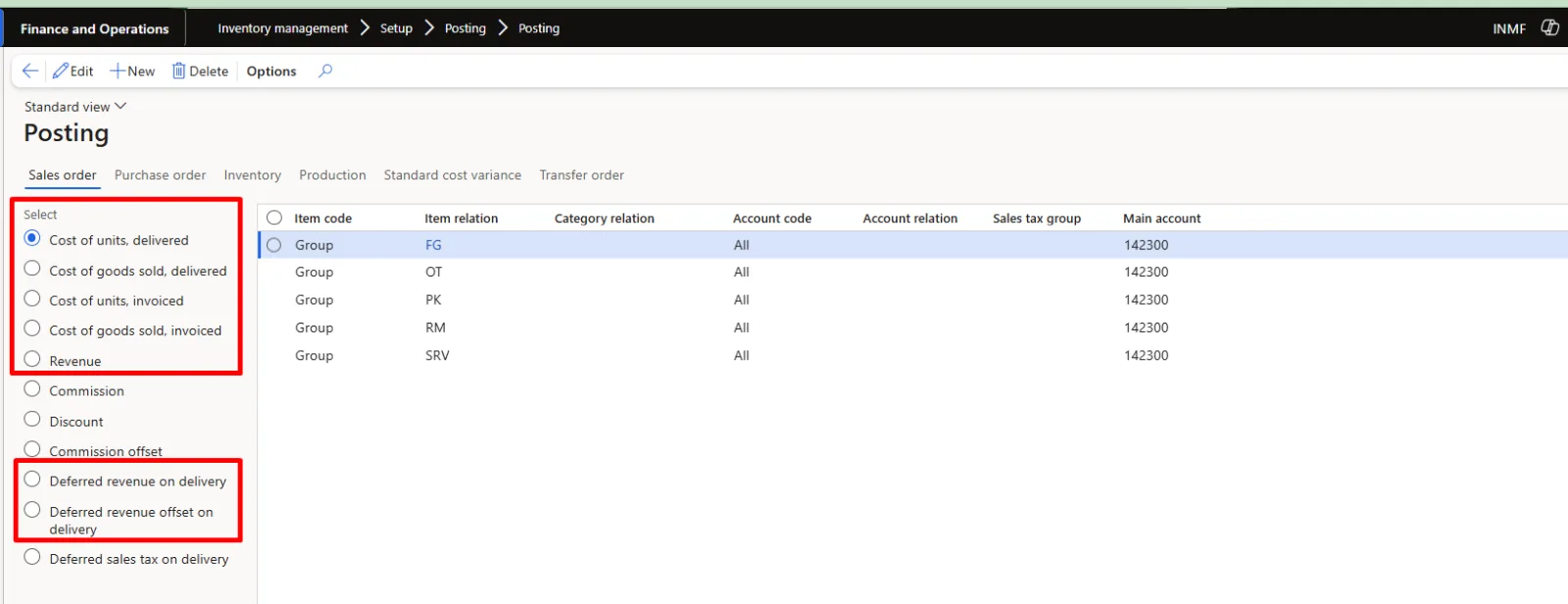
- Inventory posting profile (Sales order tab) – maps posting types such as Cost of units, delivered, Cost of goods sold, delivered, Sales – packing slip revenue and its offset, Sales order revenue, Cost of units, invoiced and Cost of goods sold, invoiced to main accounts.
- Customer posting profile – defines the Trade Receivables summary account for each customer group.
- Terms of payment and cash discount – define the due date and the discount percentage and period offered for early payment.
- Tax setup – for India, GST tax components, HSN/SAC codes and tax information on the sales order line determine the output tax (CGST/SGST/IGST payable) postings, while the TDS group on the customer determines the TDS receivable posting (on the invoice in this example).
- Create and validate a sales order based on customer requirements.
- Confirm the sales order with the customer.
- Prices and discounts default from trade agreements, and the customer's credit limit is checked at order entry or confirmation based on Credit and collections parameters.
- Delivery date control (for example, ATP or CTP) validates the promised ship and receipt dates against available inventory and lead times.
- Posting the confirmation creates a confirmation journal for reference only; it has no ledger impact. The order stays in Open order status.
- Navigation: Sales and marketing > Sales orders > All sales orders; confirm through Sell tab > Generate > Confirm sales order.
- Validate the customer account, site and warehouse, requested ship and receipt dates, unit price and discounts, financial dimensions and tax details (HSN code, GST group and item GST group for India).
- The confirmation document can be printed or emailed to the customer through print management.
- Allocation of inventory for the confirmed sales order.
- Physical reservation of inventory for the sales order.
- Reservation can be Manual, Automatic or Explosion, as set in Accounts receivable parameters or on the order. Reserved lines move to inventory transaction status Reserved physical.
- In warehouse-enabled sites, the order is released to the warehouse, which creates shipments and loads, and wave processing generates picking work based on location directives and the reservation hierarchy.
- Navigation: Sales order line > Inventory > Reservation for manual reservation, or Warehouse tab > Actions > Release to warehouse for warehouse-enabled items.
- No accounting entries are posted at this stage.
- Pick items from inventory and pack for shipment.
- Picking list registration (or completed warehouse pick work) updates the inventory transaction status to Picked, with no ledger impact.
- Posting the packing slip records the physical issue and updates the status to Deducted.
- Navigation: Sales order > Pick and pack tab > Generate > Picking list / Post packing slip; the packing slip number serves as the delivery challan reference.
Optional Accounting Entries:
– Debit: Cost of goods sold, delivered
– Credit: Inventory Clearing – Shipped, un-invoiced
– Credit: Deferred revenue on delivery
– Debit: Trade Receivables – Not Invoiced
– Net effect in this example (voucher INMF-1000013): Debit FG delivered – COGS 1,19,846.80 and Credit Inventory Clearing – Shipped, un-invoiced 1,19,846.80 for cost, and Credit Deferred revenue on delivery 6,00,000.00 and Debit Trade Receivables – Not Invoiced 6,00,000.00 for revenue.
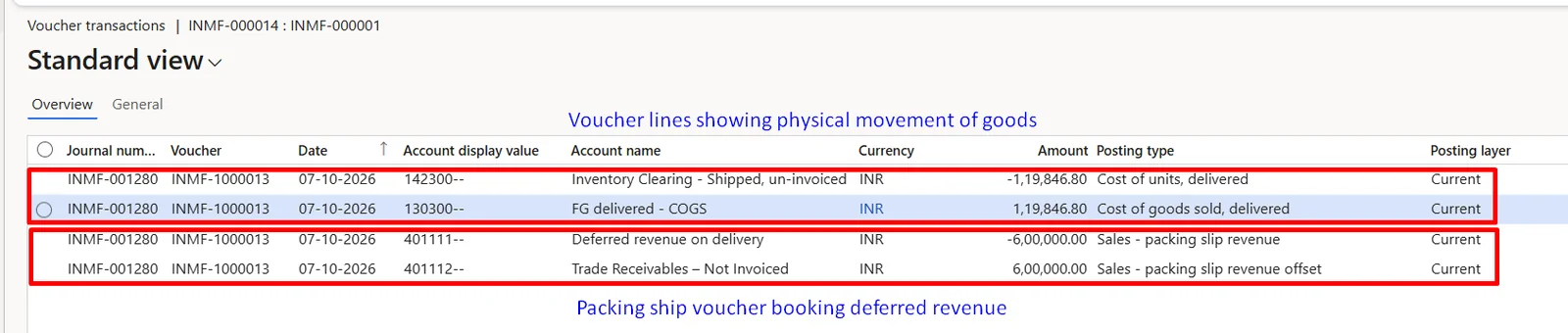
These entries post only when Post packing slip in ledger is enabled in Accounts receivable parameters and Post physical inventory is enabled on the item model group. The ledger accounts are taken from Inventory posting setup (Sales order tab), and the vouchers are reversed when the invoice is posted.
- Inventory Movement:
- Physical inventory reduction – With physical voucher and physical cost on the basis of inventory valuation = Moving Average.
– Physical movement details like Physical Voucher, Physical Date and Physical Cost of inventory are recorded.
– Inventory transaction status changes from Picked (or Reserved physical) to Deducted, and the physical cost of 1,19,846.80 is recorded at the running moving average cost on the posting date.
- Generate an invoice based on delivered items and calculate taxes.
- Posting the invoice updates the inventory transaction status to Sold, creates the open customer transaction and posts the financial voucher.
- For India GST, tax is calculated as CGST and SGST for intra-state supplies or IGST for inter-state supplies, and an e-invoice (IRN) is generated where applicable.
- Navigation: Sales order > Invoice tab > Generate > Invoice.
- Set the invoice quantity default to “Packing slip” so that only delivered quantities are invoiced.
- Freight or other miscellaneous charges can be added at header or line level and are posted to the configured charge accounts.
Accounting Entries:
Reversal of accounting posted at Picking and Packing
– Debit: Accounts Receivable (Total Invoice Amount, net of TDS)
– Debit: TDS Recoverable (where the customer deducts TDS on the invoice)
– Credit: Sales Revenue (Net Sales Amount)
– Credit: Tax Payables
– Debit: Cost of Goods Sold (COGS)
– Credit: Inventory
– Net effect in this example (voucher INMF-10000058): Debit Trade Receivables – Domestic 7,08,000.00 and Debit TDS Recoverable 12,000.00, Credit Sales – Finished Goods 6,00,000.00, Credit CGST payable 60,000.00 and Credit SGST payable 60,000.00; Debit COGS – Finished Goods 1,19,846.80 and Credit Issue-Finished Goods 1,19,846.80, with both packing slip entries reversed in the same voucher.
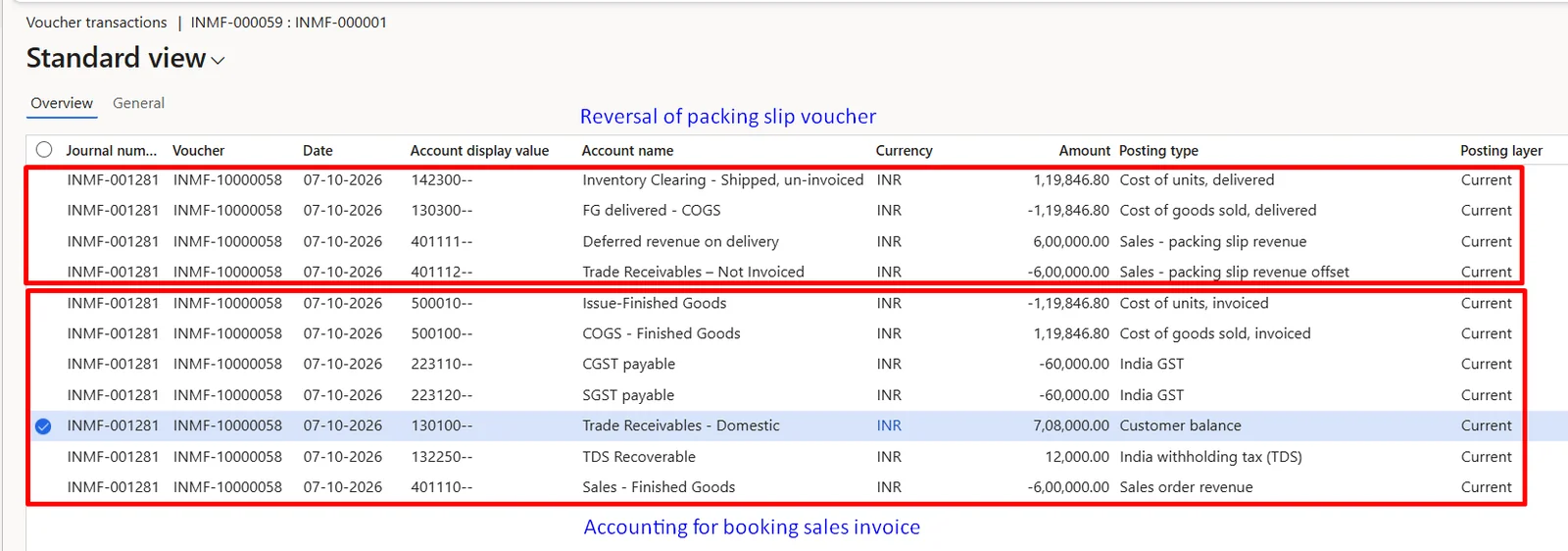
The Accounts Receivable account is derived from the customer posting profile, while revenue, COGS and inventory accounts come from Inventory posting setup.
Financial Cost of inventory is recorded based on moving average method of inventory valuation.
- Financial Movement of goods:
– Financial movement details like Financial Voucher, Financial Date and Financial Cost of inventory are recorded.
– Inventory transaction status changes from Deducted to Sold. Under moving average the issue is costed at the running average on the posting date, so no later cost adjustment from inventory closing is expected.
- Ship the packed items to the customer.
- Confirm delivery with the customer.
- In warehouse-enabled scenarios, shipment confirmation is performed on the load, and Transportation management can capture the carrier, freight charges and bill of lading.
- Statutory documents such as the e-way bill are generated for the movement of goods where required.
- Proof of delivery from the customer supports revenue recognition and helps resolve later disputes over quantity or condition.
- Navigation: Warehouse management > Loads > All loads > Confirm outbound shipment, for warehouse-enabled scenarios.
- Receive and apply payment from the customer.
- Payments are recorded through the customer payment journal using the relevant method of payment, such as bank transfer, cheque or a bank integration file.
- Navigation: Accounts receivable > Payments > Customer payment journal > Lines; mark the open invoice through Settle transactions.
- Where the customer deducts TDS, the TDS group on the payment line calculates the amount withheld, and the cash discount is calculated on settlement if payment falls within the discount period.
Accounting Entries:
– Debit: Cash/Bank Account
– Credit: Accounts Receivable
Where the customer deducts TDS:
– Debit: TDS Receivable
– Credit: Accounts Receivable
Where a cash discount is availed:
– Debit: Customer Cash Discount
– Credit: Accounts Receivable
– Net effect in this example: TDS of 12,000.00 was already recorded on the invoice, so the open receivable is 7,08,000.00. The payment voucher INMF-CU000051 posts Debit Bank Account – INR 7,05,000.00 and Credit Trade Receivables – Domestic 7,05,000.00, while the cash discount voucher INMF-80000006 posts Debit Cash Discounts 3,000.00 and Credit Trade Receivables – Domestic 3,000.00.
– On posting, the payment and cash discount together settle the invoice of 7,08,000.00 in full, closing the customer transaction.


- Reconcile & settle payments with outstanding invoices.
- Settlement can be done manually through Settle transactions or automatically based on the settlement priority in Accounts receivable parameters. Over and under payments within the defined tolerance are written off to the configured accounts.
- For foreign currency invoices, exchange rate differences between invoice and payment dates are posted as realized gain or loss on settlement.
- Monitor and manage accounts receivable aging.
- Generate reports on sales, invoices, and receivables.
- Customer aging snapshots, based on defined aging period definitions, feed the Collections page and Credit and collections workspace for follow-up activities.
- Overdue balances can be managed through collection letters, interest notes and credit holds.
- Standard outputs include the Customer aging report, Customer balance list and Financial reports for the income statement and balance sheet.
- Reconcile the AR subledger with the AR summary account in the general ledger before period close.
- Use Advanced bank reconciliation to import bank statements, match them with customer receipts and post any differences.
- Review open packing slips so that Cost of goods sold, delivered, Inventory Clearing – Shipped, un-invoiced, Deferred revenue on delivery and Trade Receivables – Not Invoiced carry no balance for invoiced deliveries.
- Reconcile output GST with GSTR-1 and GSTR-3B, and TDS receivable with Form 26AS, before filing returns.
- Close the period for Sales and Accounts receivable through the ledger calendar and the Financial period close workspace.
By understanding these steps, tracking inventory movements (both physical and financial), and managing associated accounting entries, organizations can ensure accuracy and efficiency in their financial processes. These accounting principles remain consistent across different ERP software.
In D365 F&O specifically, the customer posting profile, Inventory posting setup and item model group together determine where each of these entries lands, so these setups should be validated before go-live.
The table below lists the vouchers posted for the sales order to customer Wingtip Toys India Ltd. (INMF-000001) on 07-Oct-2026, as extracted from D365 F&O.
Document | Voucher | Account | Account name | Posting type | Debit | Credit |
Packing Slip | INMF-1000013 | 142300 | Inventory Clearing - Shipped, un-invoiced | Cost of units, delivered | 1,19,846.80 | |
Packing Slip | INMF-1000013 | 130300 | FG delivered - COGS | Cost of goods sold, delivered | 1,19,846.80 | |
Packing Slip | INMF-1000013 | 401111 | Deferred revenue on delivery | Sales - packing slip revenue | 6,00,000.00 | |
Packing Slip | INMF-1000013 | 401112 | Trade Receivables - Not Invoiced | Sales - packing slip revenue offset | 6,00,000.00 | |
Invoice | INMF-10000058 | 401110 | Sales - Finished Goods | Sales order revenue | 6,00,000.00 | |
Invoice | INMF-10000058 | 142300 | Inventory Clearing - Shipped, un-invoiced | Cost of units, delivered | 1,19,846.80 | |
Invoice | INMF-10000058 | 130300 | FG delivered - COGS | Cost of goods sold, delivered | 1,19,846.80 | |
Invoice | INMF-10000058 | 401111 | Deferred revenue on delivery | Sales - packing slip revenue | 6,00,000.00 | |
Invoice | INMF-10000058 | 401112 | Trade Receivables - Not Invoiced | Sales - packing slip revenue offset | 6,00,000.00 | |
Invoice | INMF-10000058 | 500010 | Issue-Finished Goods | Cost of units, invoiced | 1,19,846.80 | |
Invoice | INMF-10000058 | 500100 | COGS - Finished Goods | Cost of goods sold, invoiced | 1,19,846.80 | |
Invoice | INMF-10000058 | 223110 | CGST payable | India GST | 60,000.00 | |
Invoice | INMF-10000058 | 223120 | SGST payable | India GST | 60,000.00 | |
Invoice | INMF-10000058 | 130100 | Trade Receivables - Domestic | Customer balance | 7,08,000.00 | |
Invoice | INMF-10000058 | 132250 | TDS Recoverable | India withholding tax (TDS) | 12,000.00 | |
Payment | INMF-CU000051 | 110125 | Bank Account - INR | Bank | 7,05,000.00 | |
Payment | INMF-CU000051 | 130100 | Trade Receivables - Domestic | Customer balance | 7,05,000.00 | |
Cash Discount | INMF-80000006 | 130100 | Trade Receivables - Domestic | Customer balance | 3,000.00 | |
Cash Discount | INMF-80000006 | 520201 | Cash Discounts | Customer cash discount | 3,000.00 | |
Total | 29,87,540.40 | 29,87,540.40 |
By understanding these steps and the related accounting entries, organizations can ensure accuracy and efficiency in their financial processes.
Main Account Name | Opening Balance | Debit | Credit | Closing Balance |
Bank Account - INR | -9,00,000.00 | 7,05,000.00 | - | -1,95,000.00 |
Trade Receivables - Domestic | - | 7,08,000.00 | 7,08,000.00 | - |
FG delivered - COGS | - | 1,19,846.80 | 1,19,846.80 | - |
CGST recoverable | 81,900.00 | - | - | 81,900.00 |
SGST recoverable | 81,900.00 | - | - | 81,900.00 |
TDS Recoverable | - | 12,000.00 | - | 12,000.00 |
Inventory Clearing - Shipped, un-invoiced | - | 1,19,846.80 | 1,19,846.80 | - |
Work in process - Manufacturing | 2,50,000.00 | - | - | 2,50,000.00 |
TDS on Purchase | -81,900.00 | - | - | -81,900.00 |
CGST payable | - | - | 60,000.00 | -60,000.00 |
SGST payable | - | - | 60,000.00 | -60,000.00 |
Sales - Finished Goods | - | - | 6,00,000.00 | -6,00,000.00 |
Deferred revenue on delivery | - | 6,00,000.00 | 6,00,000.00 | - |
Trade Receivables - Not Invoiced | - | 6,00,000.00 | 6,00,000.00 | - |
Issue-Finished Goods | - | - | 1,19,846.80 | -1,19,846.80 |
Raw Material Consumption | -12,308.50 | - | - | -12,308.50 |
COGS - Finished Goods | - | 1,19,846.80 | - | 1,19,846.80 |
WIP - Production | -2,50,000.00 | - | - | -2,50,000.00 |
Cash Discounts | -900.00 | 3,000.00 | - | 2,100.00 |
Raw Materials Receipts | 8,19,000.00 | - | - | 8,19,000.00 |
Finished Goods - Inventory | 2,62,308.50 | - | - | 2,62,308.50 |
Direct Labor Applied | -2,50,000.00 | - | - | -2,50,000.00 |
Total | - | 29,87,540.40 | 29,87,540.40 | - |
Observations from the trial balance:
- Opening balances are the closing balances of Part 2 (Raw Material to Finished Goods); the Debit and Credit columns are the postings of this O2C cycle.
- The packing slip accounts (FG delivered – COGS and Inventory Clearing – Shipped, un-invoiced for cost of 1,19,846.80; Deferred revenue on delivery and Trade Receivables – Not Invoiced for revenue of 6,00,000.00) net to zero, confirming that the packing slip entries were fully reversed on invoicing.
- Trade Receivables – Domestic nets to zero because the invoice of 7,08,000.00 has been settled by the receipt of 7,05,000.00 and the cash discount of 3,000.00.
- The invoice reconciles: Bank 7,05,000.00 + TDS Recoverable 12,000.00 + Cash discount 3,000.00 = Sales 6,00,000.00 + CGST 60,000.00 + SGST 60,000.00 = 7,20,000.00.
- Finished goods stock reduces from 2,62,308.50 to 1,42,461.70 (Finished Goods - Inventory 2,62,308.50 – Issue-Finished Goods 1,19,846.80), as only part of the production output is sold. Raw material of 8,06,691.50 also remains in stock from Part 2.
- Cash Discounts carries the vendor discount of 900.00 from Part 1 (credit) and the customer discount of 3,000.00 from this cycle (debit) in the same main account, closing at a net debit of 2,100.00.
Particulars | Amounts (2026-27) |
Income | |
Revenue from Operations | 6,00,000.00 |
Other Income (Vendor cash discount) | 900.00 |
Total Income | 6,00,900.00 |
Expenses | |
Changes in Inventories of Finished Goods (COGS) | 1,19,846.80 |
Absorbed production costs (Direct Labor Applied) | -2,50,000.00 |
Other Expenses (Customer cash discount) | 3,000.00 |
Total Expenses | -1,27,153.20 |
Profit Before Exceptional Items and Tax | 7,28,053.20 |
Exceptional Items | - |
Profit Before Tax | 7,28,053.20 |
Profit After Tax for the Year | 7,28,053.20 |
Total Comprehensive Income for the year | 7,28,053.20 |
The O2C cycle adds sales revenue of 6,00,000.00, cost of goods sold of 1,19,846.80 and the customer cash discount of 3,000.00, giving a gross margin of 4,80,153.20 on the goods sold. The statement also carries the vendor cash discount of 900.00 from Part 1 and the labour absorption credit of 2,50,000.00 from Part 2; in a live ledger the matching wages would be posted separately, so the absorption credit is not a real profit. Although both cash discounts post to the same Cash Discounts account, they are shown separately as Other Income and Other Expenses. GST collected and TDS withheld do not affect profit, and the packing slip accounts net to zero on invoicing, so they do not appear in the statement.
Particulars | Amounts (2026-27) |
ASSETS | |
Current Assets | |
(a) Inventories | |
Raw materials | 8,06,691.50 |
Finished goods | 1,42,461.70 |
(b) Financial Assets | |
(i) Trade Receivables | - |
(ii) Cash and Cash Equivalents | -1,95,000.00 |
(c) Current Tax Assets (Net) (TDS receivable) | 12,000.00 |
(d) Other Current Assets (GST recoverable) | 1,63,800.00 |
Total Current Assets (B) | 9,29,953.20 |
TOTAL ASSETS | 9,29,953.20 |
EQUITY AND LIABILITIES | |
Equity | |
(b) Other Equity | 7,28,053.20 |
Total Equity (D) | 7,28,053.20 |
Current Liabilities | |
(c) Other Current Liabilities (GST payable) | 1,20,000.00 |
(d) Current Tax Liabilities (Net) (TDS payable) | 81,900.00 |
Total Current Liabilities (E) | 2,01,900.00 |
TOTAL EQUITY AND LIABILITIES | 9,29,953.20 |
The balance sheet closes the series. Inventories of 9,49,153.20 comprise raw materials of 8,06,691.50 not yet consumed and finished goods of 1,42,461.70 not yet sold. The customer receipt of 7,05,000.00 reduces the bank overdraft from Part 1 to 1,95,000.00, which is negative only because no opening bank balance exists in this example. Trade receivables are nil as the invoice is fully settled. TDS receivable of 12,000.00 is shown under current tax assets, as tax deducted at source is an advance against income tax. Input GST of 1,63,800.00 and output GST of 1,20,000.00 are shown gross; in practice they are set off in the GST return.