Accounting in D365, Part 1: Procure to Pay
The P2P cycle is a crucial process in any organization, ensuring smooth operations from procurement to payment. Here’s a breakdown of the key events and associated accounting entries in D365 F&O:
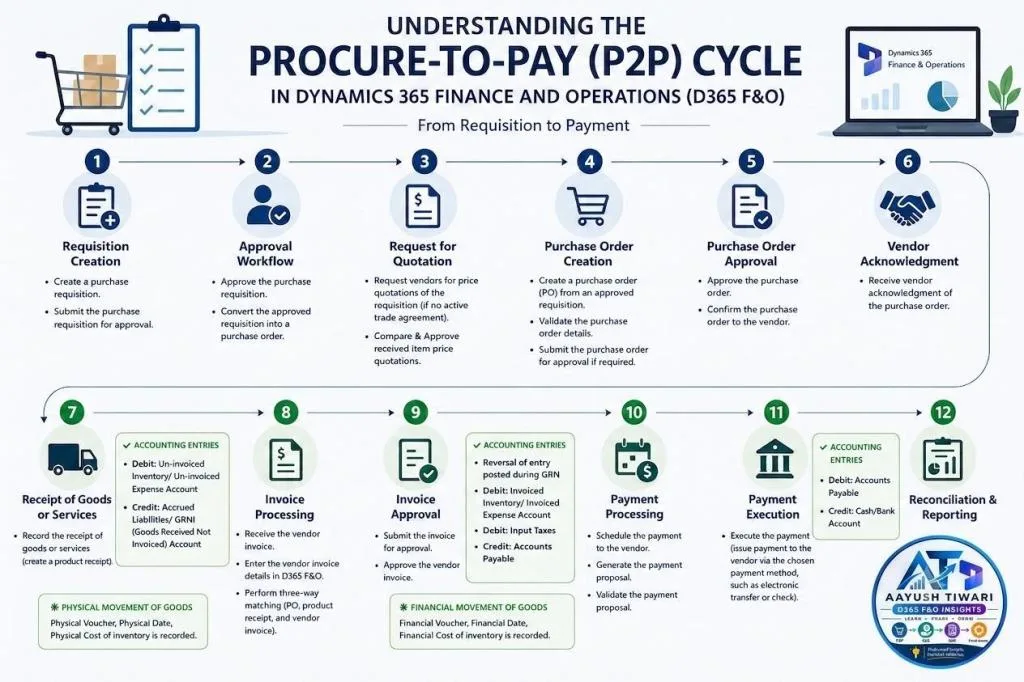
The vouchers explained below are driven by a few key setups in D365 F&O, which should be validated before the cycle is executed:
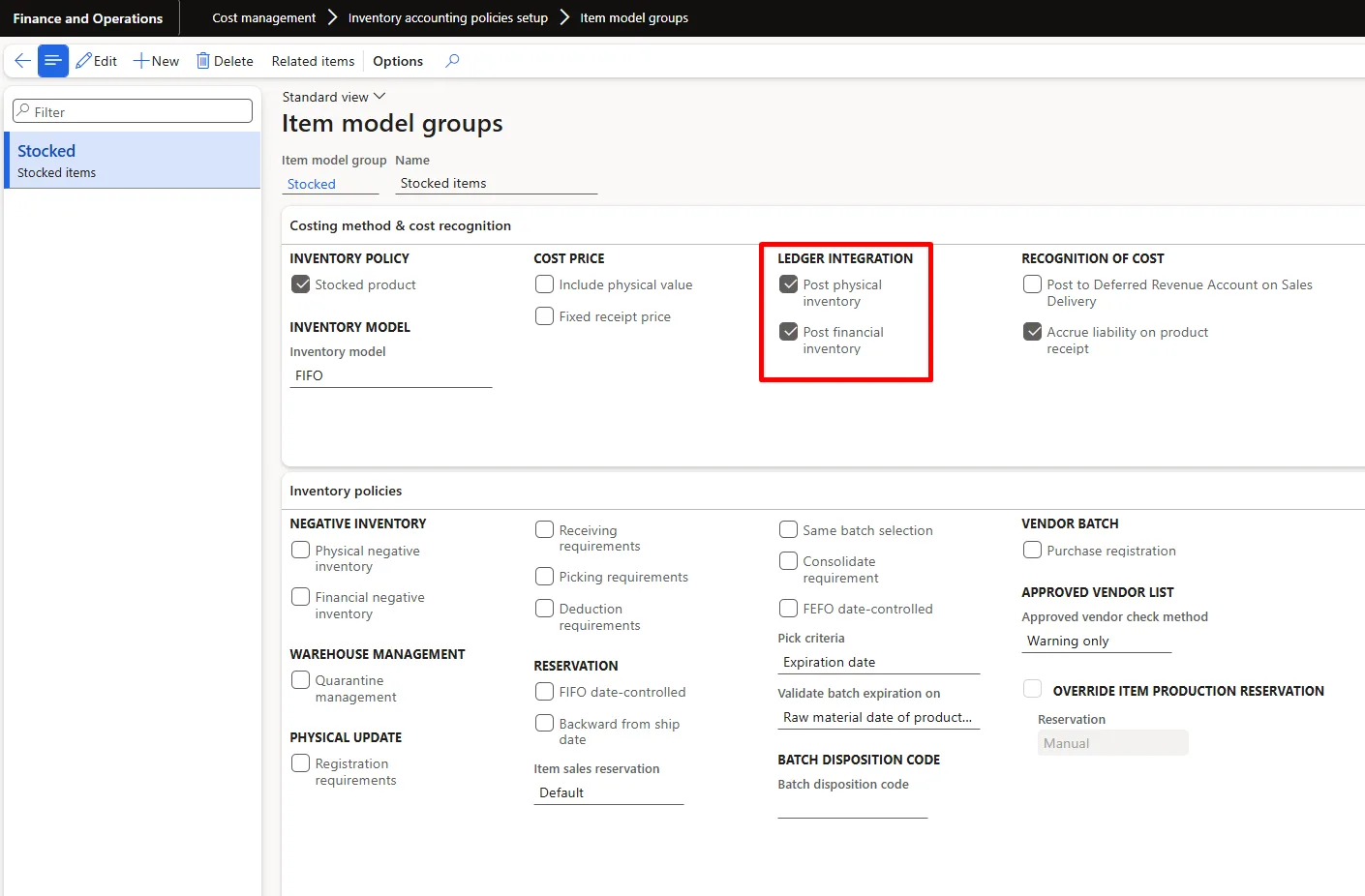
- Item model group – “Post physical inventory” and “Post financial inventory” control whether product receipts and vendor invoices of stocked items update the general ledger.
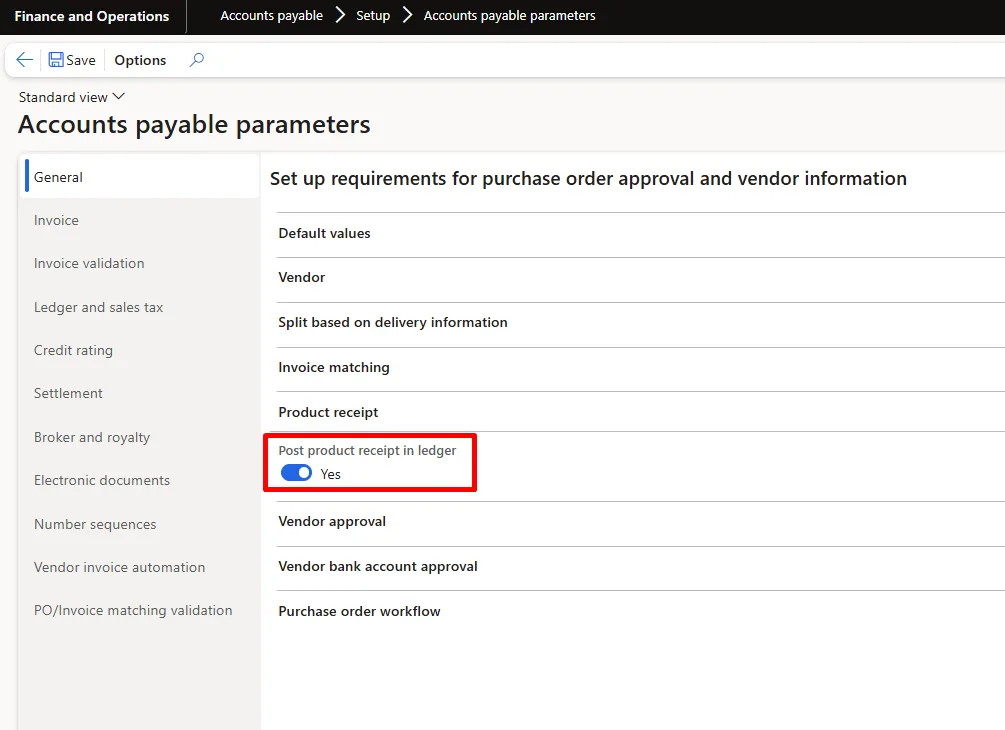
- Accounts payable parameters – “Post product receipt in ledger” controls whether the product receipt creates an accrual voucher.
- Inventory posting profile – maps posting types such as Product receipt, Purchase expenditure un-invoiced, Purchase accrual, Inventory receipt, Purchase expenditure for product and Purchase discount to main accounts.
- Vendor posting profile – defines the Accounts Payable summary account for each vendor group.
- Tax setup – for India, GST tax components, HSN/SAC codes and tax information on the PO line determine the Input Tax (IGST/CGST/SGST recoverable) postings.
Click Here to open the How to Create Purchase Requisition Blog
- Create a purchase requisition.
- Submit the purchase requisition for approval.
- Navigation: Procurement and sourcing > Purchase requisitions > All purchase requisitions.
- Define the requisition purpose (Consumption or Replenishment), items or procurement categories, quantities, requested date and financial dimensions.
- Budget checks can be performed at this stage if budget control is enabled.
Note: No ledger voucher is posted at the requisition stage; it is a non-financial document.
- Approve the purchase requisition.
- Convert the approved requisition into a purchase order.
- Approval routing is configured under Procurement and sourcing > Setup > Procurement and sourcing workflows, typically by amount, procurement category or financial dimension.
- Approved requisitions are released to purchase orders automatically or manually through Procurement and sourcing > Purchase requisitions > Release approved purchase requisitions.
- Request vendors for price quotations of the requisition (In absence of an active trade agreement).
- Compare & Approve received item price quotations.
- Navigation: Procurement and sourcing > Requests for quotations > All requests for quotations.
- Send the RFQ to one or more vendors, record vendor replies (price, quantity, lead time) and compare them side by side.
- Accept the winning reply to generate a purchase order or purchase agreement; the remaining replies can be rejected and vendors notified.
Click Here to open the How to Create Purchase Requisition Blog
- Create a purchase order (PO) from an approved requisition.
- Validate the purchase order details.
- Submit the purchase order for approval if required.
- Navigation: Procurement and sourcing > Purchase orders > All purchase orders.
- Validate the vendor account, site and warehouse, delivery date, unit price and discounts (defaulted from trade agreements or purchase agreements), financial dimensions and tax details (HSN code, GST group and item GST group for India).
- Enable change management on the purchase order to enforce the approval workflow and maintain PO versions.
Note: Creating a purchase order has no ledger impact.
- Approve the purchase order.
- Confirm the purchase order to the vendor.
- On confirmation, D365 F&O posts a purchase order confirmation journal and the approval status changes to Confirmed.
- Any subsequent change to a confirmed PO creates a new version and, with change management enabled, requires re-approval.
- The confirmation document can be printed or emailed to the vendor through print management.
- Receive vendor acknowledgment of the purchase order.
- Vendors can accept, reject or propose changes to dates, quantities and prices through the Vendor collaboration portal.
- Confirmed delivery dates update the PO lines and support inbound planning and warehouse receiving.
- Record the receipt of goods or services (create a product receipt).
- Navigation: Purchase order > Receive tab > Product receipt; the vendor’s delivery challan or packing slip number is entered as the product receipt number.
- Goods can first be registered through an arrival journal or the Warehouse Management mobile app; partial receipts are supported.
- Quality orders can be generated on receipt if quality management is enabled.
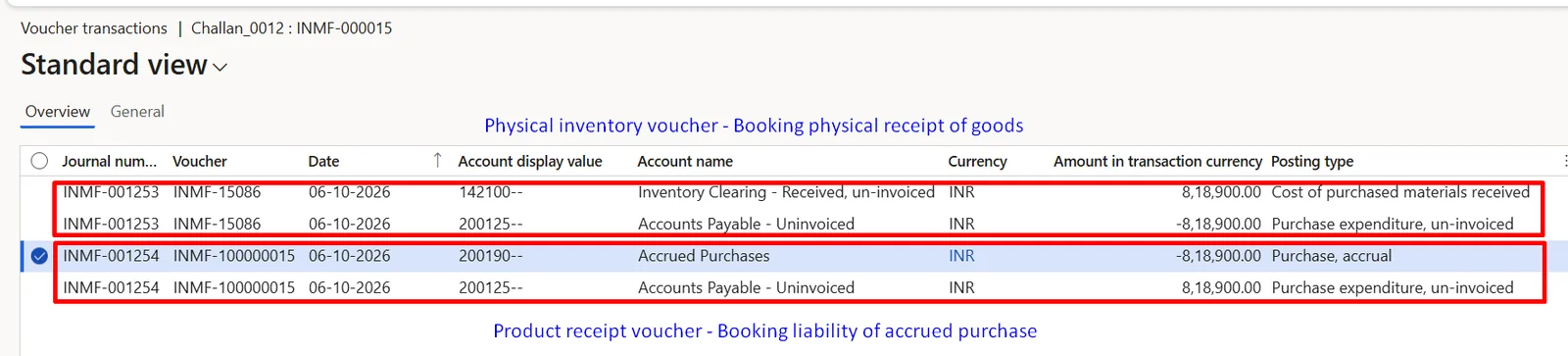
Accounting Entries:
– Debit: Un-invoiced Inventory/ Un-invoiced Expense Account
– Credit: Accrued Liabilities/GRNI (Goods Received Not Invoiced) Account
– Net effect in this example: Debit Inventory Clearing – Received, un-invoiced 8,18,900.00 and Credit Accrued Purchases 8,18,900.00, with Accounts Payable – Uninvoiced acting as the offset account between the physical inventory voucher and the product receipt voucher.
– These entries are posted only when “Post physical inventory” and “Post product receipt in ledger” are enabled; otherwise the receipt updates inventory quantity only.
- Physical Movement of goods :
– Physical movement details like Physical Voucher, Physical Date , Physical Cost of inventory is recorded.
– Inventory transaction status changes from Ordered to Received, and the physical cost is recorded at the purchase order unit price.
- Receive the vendor invoice.
- Enter the vendor invoice details in D365 F&O.
- Perform three-way matching (purchase order, product receipt, and vendor invoice).
- Navigation: Accounts payable > Invoices > Pending vendor invoices, or Purchase order > Invoice tab > Invoice.
- Default the invoice quantity from “Product receipt quantity” so that only received quantities are invoiced.
- The matching policy (two-way or three-way) and price/quantity tolerances are set in Accounts payable parameters > Invoice validation; discrepancies are reviewed on the Invoice matching details page.
- Record the vendor invoice number and invoice date, and verify GST and TDS (withholding tax) calculated on the invoice.
- Miscellaneous charges such as freight or insurance can be added at header or line level; charges set to affect inventory are included in the item cost.
- Submit the invoice for approval.
- Approve the vendor invoice.
- Vendor invoice workflow (Accounts payable > Setup > Accounts payable workflows) can route invoices by amount, vendor or matching discrepancy.
Accounting Entries:
– Reversal of entry posted during GRN
– Debit: Invoiced Inventory/ Invoiced Expense Account
– Debit : Input Taxes
– Credit: Accounts Payable
– Credit: TDS on Purchase, where withholding tax is deducted on the vendor invoice
– In this example: Debit Raw Materials Receipts 8,19,000.00, Debit CGST recoverable 81,900.00, Debit SGST recoverable 81,900.00, Credit TDS on Purchase 81,900.00 and Credit Accounts Payable – Domestic 9,00,900.00, with Purchase control Account acting as the offset account between the financial inventory voucher and the invoice voucher.
– The invoice value of 8,19,000.00 differs from the product receipt value of 8,18,900.00 by 100.00; the GRN entry is reversed at the receipt value and inventory is booked at the invoiced cost.
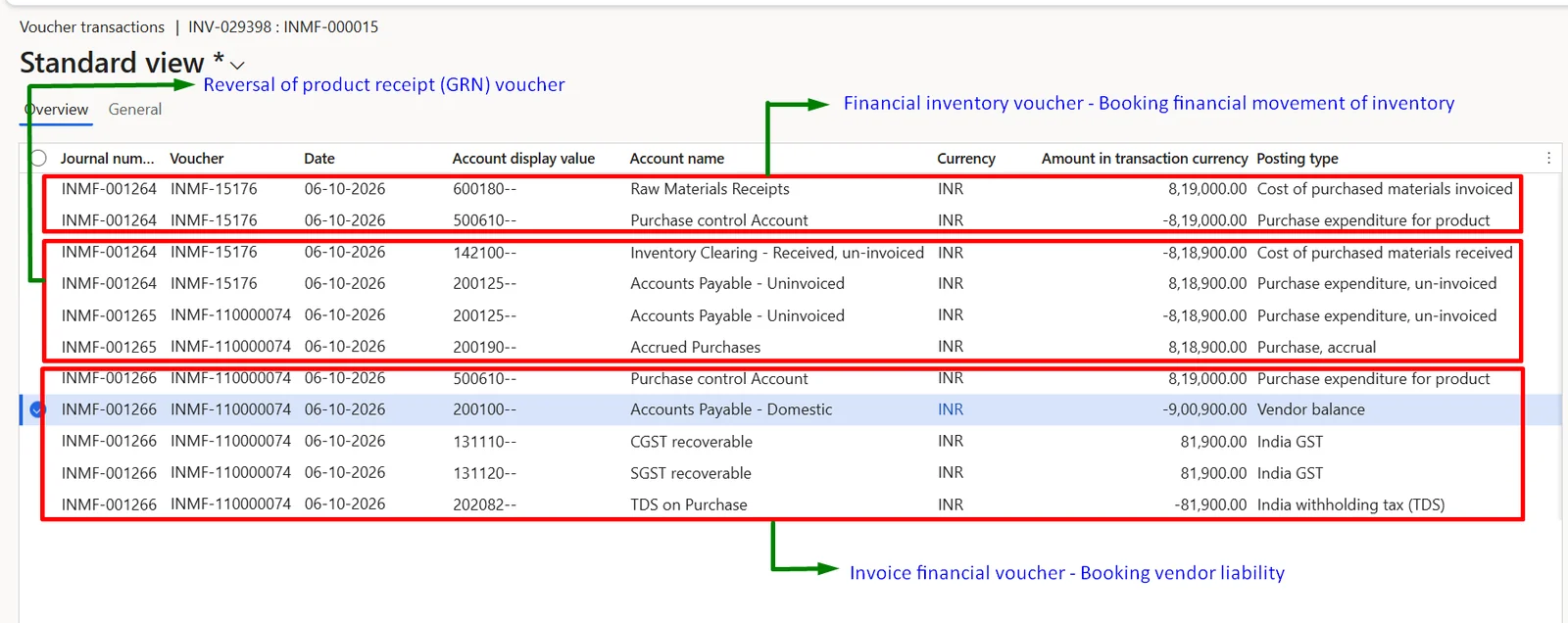
- Financial Movement of goods :
– Financial movement details like Financial Voucher, Financial Date , Financial Cost of inventory is recorded.
– Inventory transaction status changes from Received to Purchased; the difference between the physical (receipt) cost and financial (invoice) cost is adjusted automatically, and the final cost is settled when inventory closing is run as per the item’s inventory model.
- Schedule the payment to the vendor.
- Generate the payment proposal.
- Validate the payment proposal.
- Execute the payment (issue payment to the vendor via the chosen payment method, such as electronic transfer or check).
- Navigation: Accounts payable > Payments > Vendor payment journal > Payment proposal.
- Filter the proposal by due date, cash discount date, vendor or method of payment; the proposal marks the open invoices for settlement automatically.
- Generate the payment (bank file or cheque) as per the method of payment and post the journal; a payment approval workflow can be enabled on the journal name.
Accounting Entries:
– Debit: Accounts Payable
– Credit: Cash/Bank Account
– Where a cash discount is availed: Debit Accounts Payable (full amount), Credit Bank (net amount) and Credit Cash Discount account (discount taken)
– In this example: the payment voucher debits Accounts Payable – Domestic and credits Bank Account – INR for 9,00,000.00.
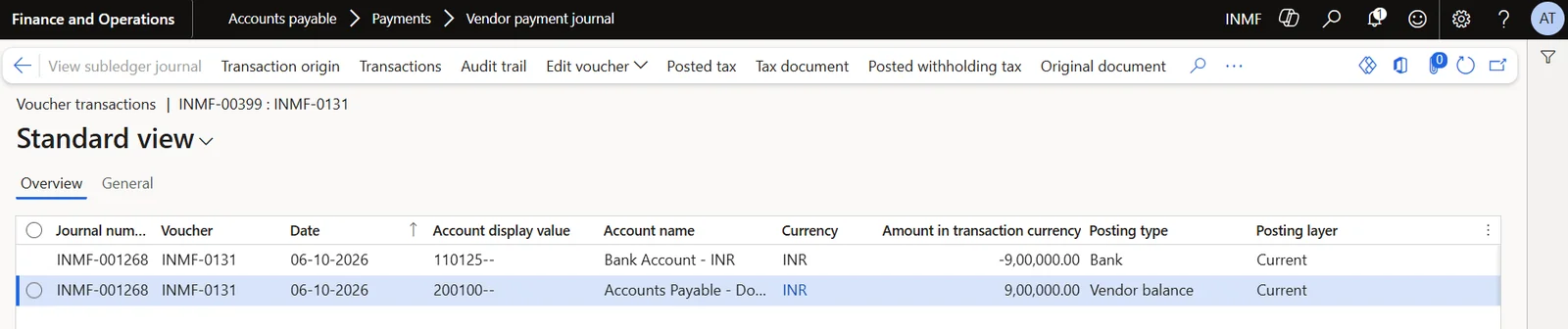
– On settlement, the cash discount of 900.00 is posted as a separate voucher: Debit Accounts Payable – Domestic and Credit Cash Discounts 900.00, which together with the payment settles the vendor invoice of 9,00,900.00 in full and closes the vendor transaction.

- Reconcile bank statements with recorded payments.
- Generate reports on procurement and payment activities.
- Close the accounting period.
- Use Advanced bank reconciliation to import bank statements, match them with bank documents and post any differences.
- Reconcile the Vendor balance list with the Accounts Payable control account, and review open product receipts through the Accrued purchases report.
- Reconcile the Inventory value report with inventory ledger accounts and run inventory closing.
- Reconcile Input GST credit with GSTR-2B before filing returns.
- Close the period for Purchasing and Accounts payable through the ledger calendar and the Financial period close workspace.
By understanding these steps and the related accounting entries, organizations can ensure accuracy and efficiency in their financial processes.
Main Account Name | Debit | Credit | Closing Balance |
Accounts Payable - Domestic | 9,00,900.00 | 9,00,900.00 | - |
Accounts Payable - Uninvoiced | 16,37,800.00 | 16,37,800.00 | - |
Accrued Purchases | 8,18,900.00 | 8,18,900.00 | - |
Bank Account - INR |
| 9,00,000.00 | -9,00,000.00 |
Inventory Clearing - Received, un-invoiced | 8,18,900.00 | 8,18,900.00 | - |
Purchase control Account | 8,19,000.00 | 8,19,000.00 | - |
CGST recoverable | 81,900.00 | - | 81,900.00 |
SGST recoverable | 81,900.00 | - | 81,900.00 |
Raw Materials Receipts | 8,19,000.00 | - | 8,19,000.00 |
Cash Discounts |
| 900.00 | -900.00 |
TDS on Purchase |
| 81,900.00 | -81,900.00 |
Observations from the trial balance:
- Clearing accounts (Accounts Payable – Uninvoiced, Accrued Purchases, Inventory Clearing – Received, un-invoiced and Purchase control Account) net to zero, confirming that the product receipt entries were fully reversed on invoicing.
- Accounts Payable – Domestic nets to zero because the vendor invoice of 9,00,900.00 has been settled in full through the payment of 9,00,000.00 and the cash discount of 900.00.
- The remaining balances reconcile to the bank outflow: Raw Materials Receipts 8,19,000.00 + CGST recoverable 81,900.00 + SGST recoverable 81,900.00 – TDS on Purchase 81,900.00 – Cash Discounts 900.00 = 9,00,000.00.
- These closing balances are the opening balances for Part 2, where the raw material is consumed in production.
Particulars | Amounts (2026-27) |
Other Income | 900.00 |
|
|
Total Income | 900.00 |
|
|
Expenses |
|
Other Expenses | - |
|
|
Total Expenses | - |
|
|
Profit Before Exceptional Items and Tax | 900.00 |
Exceptional Items | - |
Profit Before Tax | 900.00 |
|
|
Profit After Tax for the Year | 900.00 |
|
|
Total Comprehensive Income for the year | 900.00 |
The only profit and loss impact of the P2P cycle is the cash discount of 900.00 availed on early payment, reported under Other Income. The purchase cost remains capitalised as raw material inventory on the balance sheet until it is consumed in production, when it moves into the cost of finished goods.
Particulars | Amounts (2026-27) |
ASSETS |
|
Current Assets |
|
(a) Inventories | 8,19,000.00 |
(b) Financial Assets |
|
(ii) Cash and Cash Equivalents | -9,00,000.00 |
(d) Other Current Assets | 1,63,800.00 |
Total Current Assets (B) | 82,800.00 |
|
|
TOTAL ASSETS | 82,800.00 |
|
|
EQUITY AND LIABILITIES |
|
Equity |
|
(b) Other Equity | 900.00 |
Total Equity (D) | 900.00 |
|
|
Liabilities |
|
Current Liabilities |
|
(d) Current Tax Liabilities (Net) | 81,900.00 |
Total Current Liabilities (F) | 81,900.00 |
|
|
TOTAL EQUITY AND LIABILITIES | 82,800.00 |
The balance sheet reflects raw material inventory of 8,19,000.00 and CGST and SGST recoverable of 1,63,800.00 against the bank outflow of 9,00,000.00, with TDS of 81,900.00 deducted from the vendor and payable to the government shown under current tax liabilities. The bank balance is negative only because no opening bank balance exists in this example, and accounts payable is nil as the vendor has been fully settled.