Vendor Payment Proposal in D365 Finance
One of the most underrated yet powerful tools I’ve seen in Dynamics 365 Finance & Operations is the Vendor Payment Proposal process.
For anyone who has worked in Accounts Payable, managing vendor payments can often feel like juggling due dates, discounts, payment methods, and approval timelines — all while ensuring compliance and accuracy. That’s where the payment proposal feature steps in as a game changer.
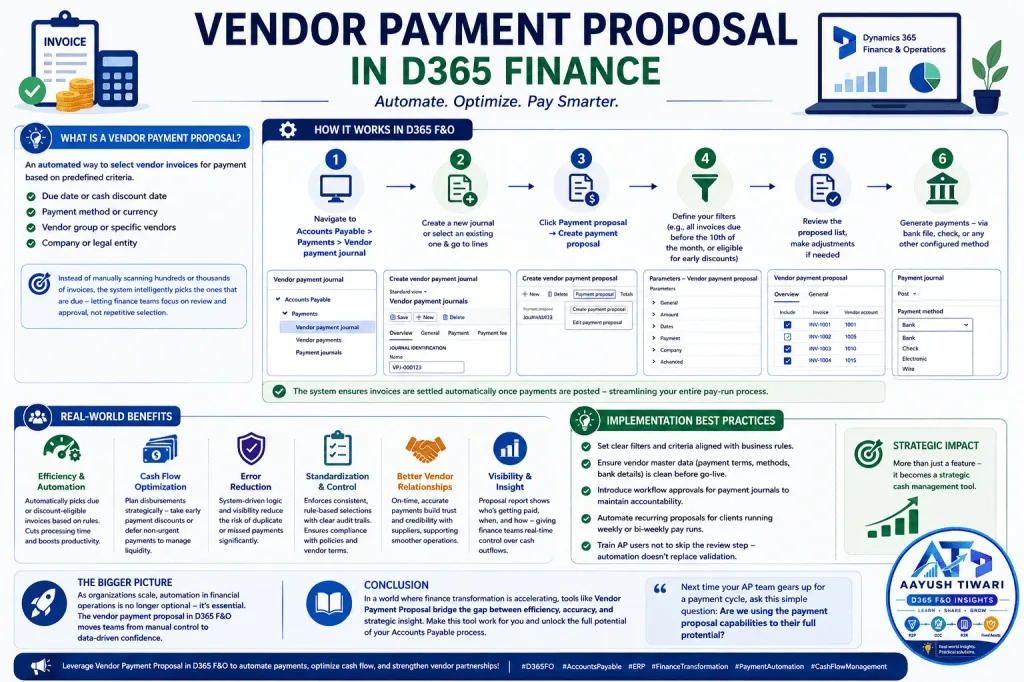
In simple terms, it’s an automated way to select vendor invoices for payment based on predefined criteria such as:
- Due date or cash discount date
- Payment method or currency
- Vendor group or specific vendors
- Company or legal entity
Instead of manually scanning through hundreds (or thousands) of invoices, the system intelligently picks the ones that are due — letting finance teams focus on review and approval rather than repetitive selection.
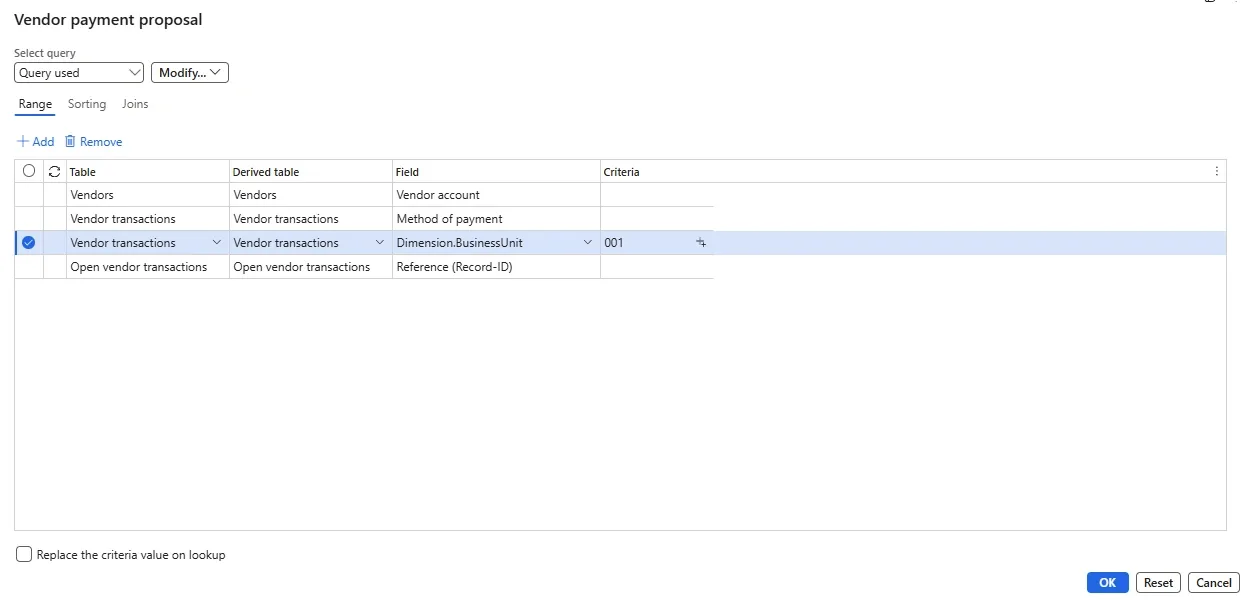
Behind the scenes, the proposal is a query organised into three areas: the Parameters tab, which holds the options most organisations use on every run; the Records to include FastTab, where the selection is narrowed by ranges such as vendor account or method of payment; and the Advanced parameters tab, which covers less frequent scenarios such as centralized payments across legal entities.
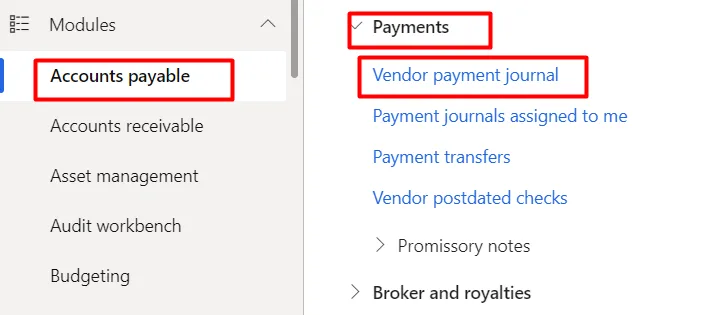
- Navigate to: Accounts Payable > Payments > Vendor payment journal
- Create a new journal or select an existing one & go to lines.
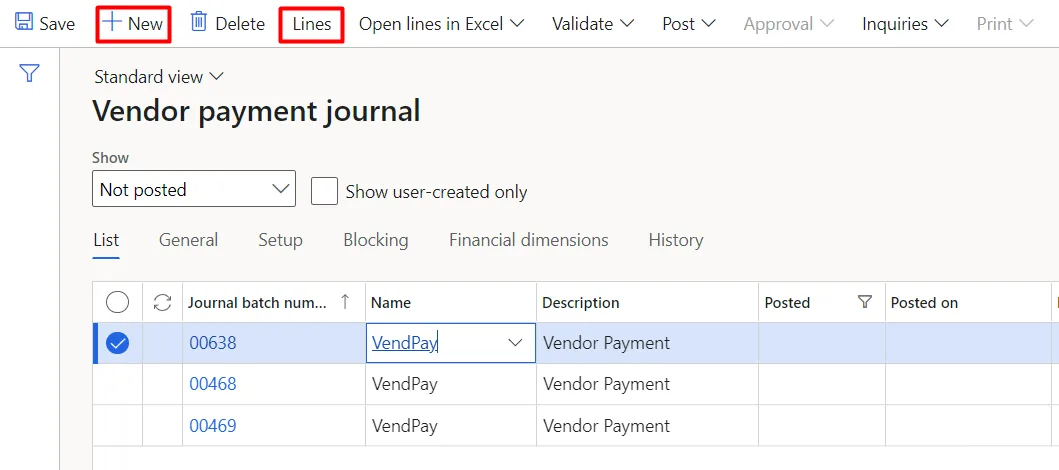
- Click Payment proposal → Create payment proposal
- Define your filters (e.g., all invoices due before the 10th of the month, or eligible for early payment discounts)
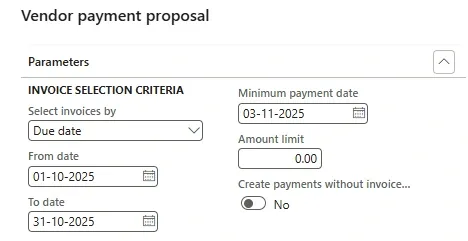
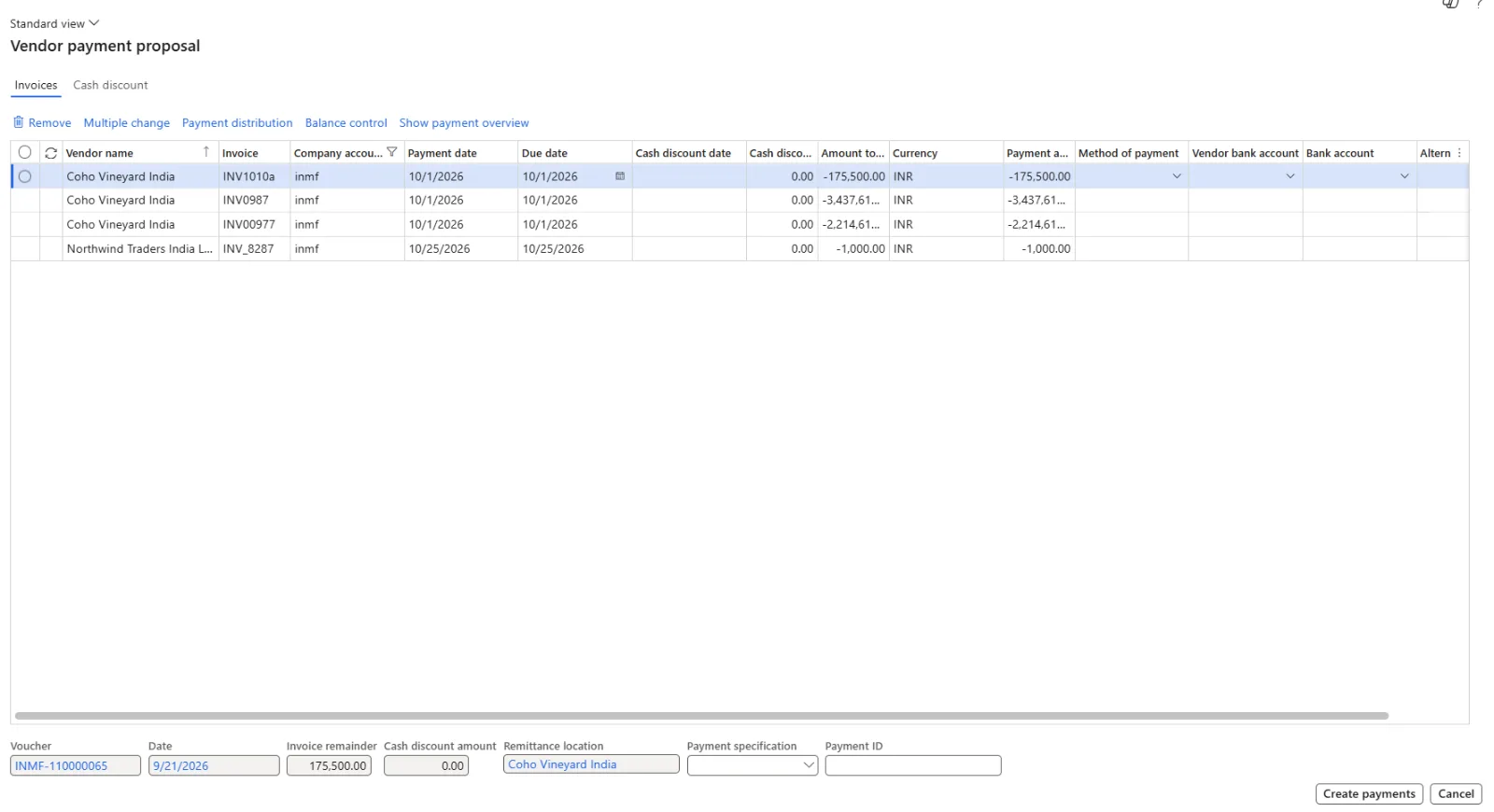
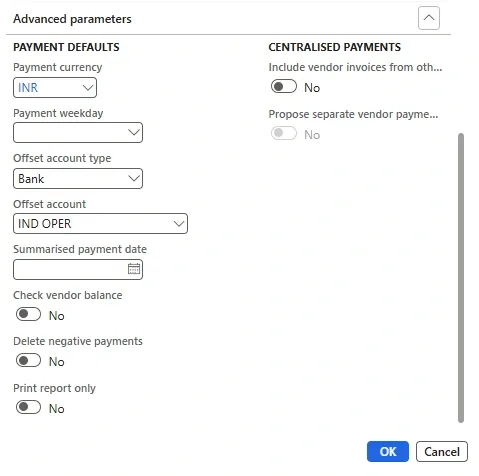
Parameters of vendor payment proposal Records to include of vendor payment proposal. Advance parameters of vendor payment proposal
- Review the proposed list, make adjustments if needed — use Edit invoices for selected payment to change the invoices behind any payment line
- Generate payments — via bank file, check, or any other configured method
The system ensures invoices are settled automatically once payments are posted — streamlining your entire pay-run process.
Key Parameters at a Glance
The Parameters tab carries the controls used on almost every run:
- Select invoices by: Choose whether invoices are picked by due date, cash discount date, or both. When the cash discount date is used, the system also checks against the session date that the discount has not already lapsed.
- From date and To date: The window within which an invoice’s due date or cash discount date must fall to be selected.
- Minimum payment date: Sets the earliest payment date. For example, with a range of 1–10 September and a minimum of 5 September, invoices due from the 1st to the 5th are paid on the 5th, while later invoices keep their own due date as the payment date.
- Amount limit: Caps the total value of payments the run can create — useful for keeping a pay run within available funds.
- Create payments without invoice preview: When set to Yes, the Payment proposal page is skipped and payments are created directly in the vendor payment journal. Lines remain editable, and the proposal view can still be reopened through Edit invoices for selected payment.
Advanced Parameters Worth Knowing
The Advanced parameters tab handles more specific scenarios:
- Check vendor balance: Skips any vendor carrying a debit balance (for example, from unsettled credit notes or payments), so those items can be settled against open invoices instead of triggering a new payment.
- Delete negative payments: Its effect depends on whether the method of payment pays per invoice or for the sum of invoices. Per invoice, Yes selects only the invoice and leaves an unsettled payment untouched, while No selects both and creates a refund line for the payment. For a sum of invoices, both items are netted into one payment — except that with Yes, nothing is selected if the net result would be a refund.
- Print report only: Produces the proposal as a report without creating any payments — handy for cash forecasting or pre-approval.
- Include vendor invoices from other legal entities: Brings in invoices from other companies for organisations that run a centralized payment process.
- Propose separate vendor payment per legal entity: Yes creates one payment per vendor for each legal entity; No consolidates invoices into a single payment under the vendor in the current legal entity (or, if that vendor does not exist there, the vendor on the first invoice).
- Payment currency: Forces all payments into one currency; left blank, each invoice is paid in its own currency.
- Payment weekday: Applies only when the method of payment period is set to Week — invoices are totalled and paid on the chosen day.
- Offset account type and Offset account: Override the defaults that come from the method of payment, for example to pay from a specific bank account.
- Summarized payment date: Applies only when the method of payment period is Total; all payments are dated on this date and the Minimum payment date is ignored.
On the Records to include FastTab, further ranges can be layered on top — for instance, restricting the run to Method of payment = Check so that only invoices with that payment method are proposed.
A note on control: how vendor bank account changes behave during a proposal run depends on the Public sector configuration key. With the key turned on, edits to vendor bank accounts are not carried into the payment journal lines; with it turned off, changes made during the run flow through. This guards against payments being redirected without oversight and supports segregation of duties and a clean audit trail.
From version 10.0.40, the Payment proposal performance improvement by splitting into even batches feature can also be enabled to speed up large runs by dividing the data into balanced batches.
The selection logic chosen on the Parameters tab directly decides which invoices land in the pay run. Consider four open invoices:
Vendor | Invoice | Invoice date | Amount | Due date | Cash discount date | Discount amount |
|---|---|---|---|---|---|---|
3050 | 1001 | 15 Jun | 500.00 | 15 Jul | 29 Jun | 10.00 |
3050 | 1002 | 20 Jun | 600.00 | 20 Jul | 4 Jul | 12.00 |
3075 | 1003 | 15 Jun | 250.00 | 29 Jun | — | 0.00 |
3100 | 1004 | 17 Jun | 100.00 | 17 Jul | 1 Jul | 1.00 |
The AP team runs a proposal on 1 July with a date range of 26 June to 10 July:
- By cash discount: Invoices 1002 and 1004 are selected because their discount dates (4 July and 1 July) fall within the range. Invoice 1001 is left out because its discount date of 29 June has already passed, and 1003 carries no discount.
- By due date: Only invoice 1003 (due 29 June) is selected; the other three fall due after 10 July.
- By due date and cash discount: Invoices 1002, 1003 and 1004 are selected. Invoice 1001 drops out on both counts — its discount has lapsed and its due date sits outside the range.
Same invoices, same dates — three different pay runs. Choosing the right basis is where cash discount capture and liquidity planning really start.
Here’s why this functionality creates real business impact:
Efficiency & Automation: No more manual invoice selection — proposals automatically pick due or discount-eligible invoices based on your rules. This cuts processing time dramatically and frees the AP team to focus on review and approvals.
Cash Flow Optimization: Finance teams can plan disbursements strategically — taking early payment discounts or deferring non-urgent payments to manage liquidity. Controls such as Amount limit and Minimum payment date help keep each run within available funds.
Error Reduction: With system-driven logic and clear visibility, the risk of duplicate or missed payments drops significantly. Options like Check vendor balance also stop payments going to vendors who already hold a debit balance.
Standardization & Control: The process enforces consistent, rule-based selections and maintains clear audit trails — reducing payment errors and ensuring compliance with internal policies and vendor terms.
Better Vendor Relationships: On-time, accurate payments build trust and credibility with suppliers — which ultimately supports smoother operations.
Visibility & Insight: The proposal report shows who’s getting paid, when, and how — giving finance teams real-time control over cash outflows.
Having implemented this process across industries — from automobile and beauty to jewelry and manufacturing — here are a few lessons I’ve learned:
- Set clear filters and criteria aligned with business rules.
- Ensure vendor master data (payment terms, methods, bank details) is clean before go-live.
- Introduce workflow approvals for payment journals to maintain accountability.
- Automate recurring proposals for clients running weekly or bi-weekly pay runs. The Vendor payment proposal automation functionality lets you schedule these runs on a recurring basis instead of relying on users to trigger them.
- Use Print report only during UAT and early pay runs so stakeholders can validate selections before any payment lines are created.
- Account for country-specific behaviour — for example, dimension control in Norway to group proposal lines by financial dimension, and the Use future due date option and dimension/currency-based bank account selection in Italy.
- Train AP users not to skip the review step — automation doesn’t replace validation.
When implemented thoughtfully, the payment proposal becomes more than just a feature — it becomes a strategic cash management tool.
As organizations scale, automation in financial operations is no longer optional — it’s essential. The vendor payment proposal in D365 F&O embodies that shift: moving teams from manual control to data-driven confidence.
In a world where finance transformation is accelerating, tools like Vendor Payment Proposal bridge the gap between efficiency, accuracy, and strategic insight.
If you’re part of a D365 F&O journey — whether as a consultant, finance professional, or system user — it’s time to make this tool work for you.
So next time your AP team gears up for a payment cycle, ask this simple question: Are we using the payment proposal capabilities to their full potential?
Reference: Microsoft Learn – Create vendor payments by using a payment proposal